Documentation
Introduction
CashLoop | Native Android (Kotlin/Compose) with Laravel Admin Panel
Thank you for purchasing CashLoop Android.
cashloop-android, Kotlin + Jetpack Compose) and the
Laravel admin panel and mobile API it runs against
(cashloop-admin-panel). Offers, partners, wallets, cashouts,
quests and home-screen layout are all owned by the panel. Jump to
Native Android for configuration, reskin and Gradle setup,
or to Run From Scratch for the full end-to-end install.
CashLoop is a ready-to-launch native GPT ("get-paid-to") rewards app for Google Play, powered by a complete Laravel 13 admin panel and a frozen mobile API. Users earn real money by installing and playing apps and games, completing surveys, finishing offerwall tasks and watching rewarded video — then withdraw it as gift cards, prepaid cards, e-wallet payouts or crypto. It is designed for publishers who want a real reward economy with an auditable money trail, not a coin counter in local storage.
Every balance change in CashLoop is a ledger row. Nothing writes a wallet
balance directly; a conversion, a quest claim, a referral payout and a withdrawal all append to
wallet_transactions, and an hourly wallet:verify job re-sums the
ledger and exits non-zero if any balance has drifted. This is the difference between a demo and
something you can put real payouts through.
Earning is attributed by click id. When a user opens an offer, the server mints a uuid, hands the app a tracked URL containing it, and the partner returns that same id on their server-to-server postback. That is how a conversion finds its user — a raw user id is never sent to a third party, and the SDKs never touch a wallet.
Key Value Propositions:
- For Users: Five clean tabs — Apps, Games, Surveys, Cashout, Profile — with a live balance in the header, boosted payouts shown with the original price struck through, daily streaks, claimable quests, levels, promo codes, referral earnings, and withdrawals that show every unmet rule at once instead of one at a time.
- For Publishers: Run the whole platform from one Laravel dashboard — partners and their credentials, offers and categories, boosts, quests, levels, streak rewards, promo codes, cashout catalogue and withdrawal queue, fraud rules, postback logs and an immutable audit trail. The home screen itself is admin-built: reorder or switch off a whole section without an app release.
- For Buyers / Developers: Full Kotlin source (Compose, Hilt, Retrofit, kotlinx.serialization, DataStore Proto), full Laravel source, migrations and seeders — no SQL dump anywhere — a frozen and documented API v1 contract, six languages, nine colour presets, and eight offerwall partners already wired with a fail-closed postback layer.
Disclaimer: This app is built to work with the included Laravel admin panel
(cashloop-admin-panel) and the following third-party services:
Firebase (Auth, Cloud Messaging, Remote Config), offerwall and survey partners
(BitLabs, ayeT-Studios, MyChips, Digital Turbine, CPAlead, Torox, Revenue Universe, MM Wall),
OneSignal (push), and optional Google AdMob / Unity Ads. These backend and partner services
are not included in the purchase — you will need to create your own accounts, sign
publisher agreements, deploy Laravel on a PHP 8.3 / MySQL 8 host, configure credentials, and
manage hosting costs yourself. Basic familiarity with Android Studio, Firebase, Laravel and
Play Console is recommended before launching.
Payouts are real money. Read Partner Postbacks before you switch a partner to active.
What's Included:
- Full native Android source code (Kotlin + Jetpack Compose, 200+ source files)
- Laravel 13 admin panel with the frozen mobile API v1
- 17 migrations and 22 seeders — the schema is the migrations, there is no SQL dump
- 9 colour presets and an onboarding variant switch
- 8 offerwall / survey partners: 4 native SDKs + 4 hosted walls, plus a generic adapter
- Usage-verified offers (on-device play-time verification via
UsageStatsManager) - Multi-language support (en, tr, de, es, it, ar)
- Setup and deployment documentation (this guide)
- Android release checklist
Key Features:
- Real Money Wallet:
decimal(14,6)balances handled with bcmath, never floats. Cash and coins, pending vs available, and a full transaction history the user can scroll. - Offers, Games and Surveys: One paginated feed implementation with three configurations, sort chips (payout, new, popular, quick, rating), category and provider filters, search, and admin-built sections above the list.
- Reward Ladders: An offer can pay in steps ("reach level 5", "spend 7 days in app") with requirements and per-step payouts shown on the detail screen.
- Boosted Payouts: When a boost is running the API sends
original_payoutandboost_percent, so the app renders the struck-through price without deciding anything itself. - Usage-Verified Offers: For offers you run yourself, the app measures real on-device play time and posts it; the server decides whether it qualifies.
- Offerwall Partners: Native SDKs for BitLabs, ayeT-Studios, MyChips and Digital Turbine, hosted walls for CPAlead, Torox, Revenue Universe and MM Wall — with a registry that always falls back to the tracked URL rather than opening nothing.
- Cashout Catalogue: Gift cards, prepaid cards, e-wallets and crypto grouped by brand, already filtered server-side to what this user can actually use.
- Quests, Streaks and Levels: Claimable — never auto-credited — with a badge on the Profile tab the moment something becomes claimable.
- Referrals: Signup bonus for both sides, a percentage of the friend's lifetime earnings, and an optional bonus on their first withdrawal.
- Promo Codes: Redeemable in-app, rate-limited separately because codes are guessable by design.
- Server-Side Kill Switches: A feature switched off in the panel has its tab removed, not greyed out.
- Maintenance & Force Update Gates: Computed server-side from
X-PlatformandX-App-Version, and deliberately terminal — no back gesture, no "continue anyway". - Guest-to-Account Flow: Anonymous Firebase session on first launch; signing in with Google, Facebook or email upgrades it in place, so the balance and streak carry over with no merge step.
- Fraud & Integrity Tooling: Configurable fraud rules, user flags, postback logs with redacted payloads, and immutable audit rows.
- White-Label Ready: Colour presets, app icon, name, locales, ad units, push, legal pages and home-screen layout — all changeable without touching gameplay code.
App identifiers (current project):
- Android
applicationId/namespace:com.cashparty.rewards.app versionCode10 ·versionName2.0- Min SDK 26 · Target / Compile SDK 36 · JDK 17+ · AGP 9 (Kotlin built in)
- Release API origin baked in as
https://panel.cashloop.app/, overridable at runtime
Support: For questions or issues, contact us via the CodeCanyon messaging system.
📦 What's Included in the Package
After purchasing and downloading CashLoop Android, your package contains everything you need to build, rebrand and publish the native Android app to Google Play, plus the backend it runs against:
| Item | What it is |
|---|---|
| Full native Android source | Kotlin + Jetpack Compose project (cashloop-android/ — app/, core/datastore-proto/, dummylib/, Gradle files). See Native Android. |
| Laravel admin panel | Full PHP backend (cashloop-admin-panel/) — admin dashboard, public site, mobile REST API at /api/v1, partner postback endpoint, 17 migrations, 22 seeders, scheduled integrity commands. |
| Partner adapters | Postback adapters for BitLabs, CPAlead and Torox, plus a config-driven GenericOfferwallAdapter that covers any partner whose dialect you can describe in settings. |
| 6 language translations | Android string resources under res/values/, values-en/, values-tr/, values-de/, values-es/, values-it/, values-ar/. |
| 9 colour presets | Arcade design-system palettes in Kotlin (ArcadePresets) — one constant switches the whole app, light and dark together. See Reskin. |
| Android unit tests | 7 JVM test classes covering the API envelope, paging, money serialization, cashout validation, home-section decoding and offerwall launcher resolution. ./gradlew :app:testDebugUnitTest |
| Backend test suite | 30 feature test files — 256 tests, all passing — over the wallet ledger, postback ingestion and signature verification, cashout eligibility and holds, the guest merge, referrals, quests and streaks, geo targeting, admin authorisation and the seeded install. php artisan test |
| Backend documentation | README.md inside the admin panel — install, configuration, console commands and the seeded install. The frozen mobile API v1 contract is documented in this guide. |
| Licences & attribution | licenses/ in the Android project — the full SIL OFL 1.1 text for the bundled fonts, per-font attribution, and the third-party asset record. |
| This documentation | The HTML guide you are reading, covering configuration, reskin, admin panel, deployment, partner setup, the Play release path and Play policy. |
php artisan migrate on an empty database produces a
complete, correct install — see Database Setup.
🤖 Native Android App Overview
CashLoop Android is a single-module Compose app plus one small library module. There is no Flutter, no WebView shell and no second UI framework — every screen you see is Compose.
| Layer | Technology |
|---|---|
| UI | Jetpack Compose · Material 3 · Navigation Compose · custom "Arcade" design system |
| DI | Hilt (KSP) |
| Networking | Retrofit 2.11 + OkHttp 4.12 + kotlinx.serialization |
| Storage | DataStore (Preferences + Proto, module core:datastore-proto) |
| Identity | Firebase Auth (anonymous, Google, Facebook, email) → API JWT |
| Config | Firebase Remote Config (one key) + GET /api/v1/config |
| Push | Firebase Cloud Messaging + OneSignal |
| Media | Coil (incl. SVG) · Lottie · compose-shimmer |
| Ads | Google Mobile Ads · Unity Ads |
| Offerwalls | BitLabs · ayeT-Studios · MyChips · Digital Turbine (FairBid) · Torox AAR |
Where each setting lives
Configuration is split deliberately, so public and secret values never share a home and so the things that must change without a release actually can:
| Layer | Location | Holds |
|---|---|---|
| Gradle build config | app/build.gradle.kts | Default API origin per build type, applicationId, versions |
| Firebase Remote Config | Firebase Console | One key only: api_base_url |
| Mobile API | GET /api/v1/config | Economy, currency, feature flags, ad unit ids, OneSignal app id, legal links, maintenance and force-update gate |
| Mobile API | GET /api/v1/providers/{slug}/sdk-config | Publisher-safe keys each offerwall SDK needs to initialise |
| Android resources | res/values/strings.xml | App name, Google OAuth client id, Facebook app id/token, AdMob application id |
| Firebase native file | app/google-services.json | Per-project Firebase identity |
Laravel .env | cashloop-admin-panel/.env | DB credentials, APP_URL, JWT_SECRET, FIREBASE_CREDENTIALS, OneSignal server key, SMTP, storage |
| Admin panel database | provider_settings | Partner credentials and postback secrets — encrypted at rest |
| Signing | debug.keystore, your own release keystore | Build signing |
⚡ Android Quick Start
Four things must be in place before the app can do anything useful:
| # | What | Where |
|---|---|---|
| 1 | Laravel admin panel running with migrations applied | cashloop-admin-panel/ — see Step 4 |
| 2 | Firebase project + google-services.json | app/google-services.json |
| 3 | Firebase service account JSON on the server | FIREBASE_CREDENTIALS in Laravel .env |
| 4 | An API origin the device can actually reach | Gradle default, -Pcashloop.apiBaseUrl, or Remote Config |
# Emulator, against a local panel on the host machine (default)
./gradlew :app:installDebug

# Physical device, against your LAN IP or a tunnel
./gradlew :app:installDebug -Pcashloop.apiBaseUrl=https://abc123.ngrok.io/

# Unit tests
./gradlew :app:testDebugUnitTesthttps://panel.example.com without the trailing slash silently drops the last
path segment.
⚙️ Android Configuration
1. API Base URL
The origin is resolved from three places, in this order — later wins:
| Order | Source | When to use it |
|---|---|---|
| 1 | BuildConfig.API_BASE_URL — baked in per build type | The permanent default for each variant |
| 2 | -Pcashloop.apiBaseUrl=… on the Gradle command line | Pointing one build at a tunnel or a LAN IP |
| 3 | Firebase Remote Config key api_base_url | Changing the origin on already-installed apps, with no release |
// app/build.gradle.kts
val debugApiBaseUrl: String =
    (findProperty("cashloop.apiBaseUrl") as String?) ?: "http://10.0.2.2:8000/"
val releaseApiBaseUrl: String =
    (findProperty("cashloop.apiBaseUrl") as String?) ?: "https://panel.cashloop.app/"
10.0.2.2 is the Android emulator's route to the host machine —
localhost inside the emulator is the emulator. On a physical device you
must use a LAN IP or a tunnel.
releaseApiBaseUrl before you build a release. Shipping with
panel.cashloop.app points every installed copy of your app at someone else's
server.
cashloop.apiBaseUrl in the project's
gradle.properties. That file is committed, and the property is read for
both variants — so a value left there silently overrides the release URL too, and every
APK you build afterwards points at your development machine. A tunnel hostname also publishes
your IP address to anyone who inspects the APK.
Pass it per-invocation with
-Pcashloop.apiBaseUrl=…, or put it in
~/.gradle/gradle.properties, which lives outside the repository. To check what a
built APK actually points at:
unzip -p app-release.apk classes.dex | strings | grep -i "https://"usesCleartextTraffic="false" in the
manifest) — except for the emulator default, every origin must be HTTPS. If you need plain HTTP
against a LAN box for a day, add a debug-only network security config rather than flipping this
flag for release.
2. Package ID & version
android {
    namespace = "com.cashparty.rewards.app"
    compileSdk = 36

    defaultConfig {
        applicationId = "com.cashparty.rewards.app"
        minSdk = 26
        targetSdk = 36
        versionCode = 10
        versionName = "2.0"
    }
}
minSdk is 26 rather than 24 on purpose: the Arcade type scale drives the variable
font weight axis through FontVariation, which the platform ignores below API 26 —
every weight would silently render at the axis default.
applicationId means recreating the Firebase Android app, replacing
google-services.json, regenerating the Google OAuth client, updating the Facebook
app's Android package, and using the new id in Play Console. All of them must match or sign-in
breaks.
3. Firebase & google-services.json
- Firebase Console → Add app → Android.
- Package name: exactly your
applicationId. - Add your debug and release SHA-1 and SHA-256 fingerprints (required for Google Sign-In).
- Download
google-services.jsonand place it atapp/google-services.json, replacing the bundled one. - Enable Authentication (Anonymous, Email/Password, Google, Facebook), Cloud Messaging and Remote Config.
4. Strings & SDK keys
Everything compiled into the binary lives in app/src/main/res/values/strings.xml.
| String | Ships as | What it is / where to get it |
|---|---|---|
app_name | CashLoop | Launcher label — your brand |
facebook_app_id | 000000000000000 | Meta for Developers → your app → Settings → Basic |
fb_login_protocol_scheme | fb000000000000000 | fb + the app id, used by the login redirect |
facebook_client_token | REPLACE_WITH_… | Meta app → Settings → Advanced |
admob_app_id | Google's public test app idca-app-pub-3940256099942544~3347511713 | AdMob console → your app. Serves test ads until replaced |
FacebookSdk.fullyInitialize() throws on a malformed app id and would take the
process down on first launch, so CashLoopApplication checks the id first and skips
Facebook setup if it is still the placeholder. Every other sign-in method keeps working. Drop in
a real id and it initialises normally — no code change.
APPLICATION_ID meta-data is missing or malformed,
which is why the shipped default is Google's real public test id rather than an obvious dummy
string. Ad unit ids are different — those come from the API and may be blank.
default_web_client_id is deliberately not in strings.xml.
The google-services Gradle plugin generates it from the OAuth client inside your
app/google-services.json, so Google Sign-In follows whichever Firebase project you
drop in. Declaring it by hand as well pins it to a second project, and if the two disagree the
ID token exchange fails in a way that is hard to trace. Replace
google-services.json and this looks after itself.
GET /providers/{slug}/sdk-config and read out of an open
settings map, so adding or rotating a partner never needs an app release. See
Offerwall Partners.
🎨 Reskin & Layout Variants
Two presentation axes are switched by a single Kotlin constant plus a rebuild. Everything else that changes the look of the app — which sections appear on a feed, in what order, with what titles — is admin-driven and needs no rebuild at all.
Colour presets (1–9)
File: app/src/main/java/com/cashparty/rewards/app/ui/theme/arcade/ArcadePresets.kt
object ArcadePresets {
    /**
     * CHANGE THIS (1..9) TO SWITCH COLOR PRESET.
     * 1 Ember Aurora  2 Emerald Pulse  3 Sunset Vinyl  4 Midnight Gold
     * 5 Neon Coral    6 Ink & Parchment  7 Bronze Luxury  8 Arcade
     * 9 CashLoop  <- active
     */
    const val SELECTED = 9
}
Each preset carries both the light and the dark role set, so switching one constant restyles the entire app in both modes — accents, canvas, surfaces, cards, dividers, text, and the CTA/social-proof gradients.
To add a tenth preset: copy an existing ArcadePreset(...) block, give it a name, add
a branch to the when in active, and set SELECTED. The
data class lists every role the theme needs, so the compiler tells you if you missed one.
Onboarding variant
File: .../ui/onboarding/OnboardingRoute.kt → OnboardingConfig.SELECTED
All variants share one completion pipeline — they differ in how they pitch the product, not in plumbing. Variant 1 (Deck) is the one implemented on Android; the remaining slots fall back to Deck until their scaffolds are ported, so changing the constant is safe but currently a no-op for 2–5.
🛠 Admin Panel → App Config
Most of what used to be an app constant is served by GET /api/v1/config and applied
on the next launch. The app fetches it before sign-in so a broken auth flow
cannot hide a "we are down" message.
| Block | Keys | What it drives |
|---|---|---|
economy | coins_per_usd, min_cashout_cash, signup_bonus_cash, signup_bonus_coins, currency_code | Every money format in the app. Never hardcode a $ — the currency symbol comes from here. |
referral | referee_bonus_cash, referrer_bonus_cash, earnings_percent, cashout_bonus_cash | The copy and numbers on the Refer a Friend screen |
features | offers, surveys, offerwalls, quests, cashout, referral, streak, promo_codes | Kill switches. A disabled feature has its tab removed, not greyed out. |
ads | admob.{enabled, banner_id, interstitial_id, rewarded_id, native_id, interstitial_interval_minutes}, unity.{enabled, game_project_id, banner_id, interstitial_id, rewarded_id}, rewarded_ad_reward_coins, daily_rewarded_ad_limit | Which ad networks run, which unit ids, and what a rewarded view pays |
release | maintenance_mode, maintenance_message, force_update, min_supported_version, latest_version | The two full-screen gates |
links | help_url, faq_url, privacy_url, terms_url, support_email | Settings rows. A null link hides its row rather than opening a blank page. |
push | onesignal_app_id | OneSignal initialisation |
update | minimum_version, latest_version, must_update, update_available, maintenance_mode, maintenance_message | Computed server-side from X-Platform and X-App-Version, so the decision cannot drift between client versions |
Where to edit these in the panel:
| Panel screen | Route |
|---|---|
| App settings (economy, features, ads, gates) | /admin/settings/app |
| General settings | /admin/settings/general |
| Contact / support | /admin/settings/contact |
Legal & help pages (served to GET /pages/{slug}) | /admin/content/pages |
| Home & feed sections, banners | /admin/app-sections |
| Locales | /admin/locales/all |
🏷 Branding — Name, Icon, Theme
| What | Where |
|---|---|
| App name | res/values/strings.xml → app_name (and each values-xx/strings.xml if you want it localised) |
| Launcher icon | res/mipmap-*/ic_launcher.png, ic_launcher_round.png, adaptive icon in mipmap-anydpi-v26/, background colour in res/values/ic_launcher_background.xml |
| Theme colours | ArcadePresets.SELECTED — see Colour presets |
| Base Android theme | res/values/themes.xml → Theme.CashParty (referenced by the manifest) |
| Fonts | res/font/ — Fredoka and Plus Jakarta Sans, wired through ui/theme/arcade/ArcadeType.kt |
| Lottie animations | res/raw/ |
res → New →
Image Asset) regenerates every density and the adaptive layers in one pass. Do that rather than
hand-replacing PNGs.
🌐 Android Locales
Six languages ship: en, tr, de, es,
it, ar. The default (untagged) res/values/strings.xml is
English and is the fallback for any key a translation is missing.
Per-app language selection uses AppCompatDelegate locale storage — the manifest
declares AppLocalesMetadataHolderService with
autoStoreLocales=true, so the choice survives reinstall-free upgrades and appears
in Android 13+ system settings. The in-app picker is
ui/settings/LanguageScreen.kt, which lists what
GET /api/v1/locales returns.
/admin/locales/all but with no values-xx/ folder shows an English UI
with localised server content. Add the resource folder, or do not enable the locale.
Arabic ships with android:supportsRtl="true"; the Compose layouts use
start/end padding rather than left/right throughout, so RTL mirrors correctly.
values-ar; the panel
and public site have five — there is no resources/lang/ar.
locales.is_active means "offered to the mobile app" and is what
GET /api/v1/locales serves, so Arabic is active there. The panel's own switcher
does not read that flag directly: ShareLocales lists only the locales that actually
have a resources/lang/{code} directory. Add resources/lang/ar and the
panel offers Arabic on the very next request — there is no second flag to remember, and the two
cannot drift apart.
💳 Ads, Push & Offerwall SDKs
Ads
Two networks, both optional, both configured server-side:
- Google AdMob — banner, interstitial, rewarded and native unit ids from
config.ads.admob. The application id is the one exception and lives in the manifest via@string/admob_app_id. - Unity Ads — banner, interstitial and rewarded placements from
config.ads.unity, managed byads/UnityBannerAdManager.ktandads/UnityRewardedAdManager.kt.
A rewarded view pays rewarded_ad_reward_coins, capped at
daily_rewarded_ad_limit per day. Setting either network's
enabled to false, or leaving its unit ids blank, removes the surface entirely —
the app does not render an empty ad slot.
Push
Both channels are wired:
- FCM —
service/CashLoopMessagingService.kt, registered in the manifest forcom.google.firebase.MESSAGING_EVENT. Tokens are posted toPOST /auth/device. - OneSignal — initialised with
config.push.onesignal_app_id; broadcast sends come from the panel at/admin/notifications. The REST key stays in the Laravel.env.
OneSignal is initialised in MainActivity only when
config.push.onesignal_app_id is non-empty, and the user is identified with
OneSignal.login(userId) so the panel can target an individual account.
POST_NOTIFICATIONS is declared in the manifest but never requested at
runtime. On Android 13+ that means notifications stay off until the user enables them
in system settings. If push matters to you, add a permission request — the natural place is
right after onboarding completes, not on the first frame.
Offerwall SDKs
Four native SDKs are compiled in. None of them credits anything — they open a wall, and rewards arrive later by server-to-server postback:
| Partner | Slug | Artifact | Settings keys it reads |
|---|---|---|---|
| BitLabs | bitlabs | com.prodege.bitlabs:core | sdk_api_key |
| ayeT-Studios | ayet | io.ayet:android-sdk-v2 | sdk_app_id (numeric), sdk_placement |
| MyChips | mychips | io.mychips:offerwall | sdk_api_key, sdk_placement |
| Digital Turbine | digital_turbine | com.fyber:fairbid-sdk | sdk_app_id, sdk_placement, sdk_api_key (salt) |
| Torox | torox | dummylib/ToroxSDK-v6.4.aar | Hosted wall — opened by tracked URL |
settings.gradle.kts adds
europe-west1-maven.pkg.dev/mychips-b31fe/mychips-android-sdk, scoped to the
io.mychips group only. It is publicly readable and needs no credentials, but do not
widen that scope — an unfiltered third-party repo can shadow an artifact from Maven Central.
📁 Android Project Structure
cashloop-android/
├── app/
│   ├── google-services.json          # Firebase identity — replace with yours
│   ├── build.gradle.kts              # applicationId, versions, API origins, dependencies
│   ├── proguard-rules.pro
│   └── src/
│       ├── main/
│       │   ├── AndroidManifest.xml
│       │   ├── res/                  # values(+ -en -tr -de -es -it -ar), drawable, font, mipmap, raw
│       │   └── java/com/cashparty/rewards/app/
│       │       ├── CashLoopApplication.kt
│       │       ├── api/              # Retrofit service, envelope, error codes, paging, interceptors
│       │       ├── ads/              # AdMob + Unity rewarded/banner managers
│       │       ├── contracts/        # Google Sign-In activity contract
│       │       ├── data/
│       │       │   ├── auth/         # AuthManager, TokenStore, DeviceIdProvider
│       │       │   ├── config/       # RemoteConfigService
│       │       │   ├── models/       # Wire models — one file per API area
│       │       │   └── repositories/ # 14 repositories, one per API area
│       │       ├── datastore/        # Proto + preferences persistence
│       │       ├── di/               # Hilt modules (App, Network, Firebase, Offerwall, Activity)
│       │       ├── offerwall/        # Launchers, registry, SDK config store, usage tracker
│       │       ├── service/          # FCM messaging service
│       │       ├── usage/            # UsageStatsManager observer, reporter, diagnostics
│       │       ├── ui/
│       │       │   ├── MainActivity.kt, CashLoopApp.kt, CashLoopAppState.kt
│       │       │   ├── shell/        # AppHeader, MainTabBar, MainTabs
│       │       │   ├── tabs/feed/    # Apps · Games · Surveys (one screen, three configs)
│       │       │   ├── tabs/profile/
│       │       │   ├── offers/       # List, detail, my offers, partners
│       │       │   ├── cashout/      # Catalogue, request sheet, validation
│       │       │   ├── wallet/       # Transactions
│       │       │   ├── engagement/   # Quests, streak, promo codes
│       │       │   ├── referral/ notifications/ settings/ auth/ onboarding/
│       │       │   ├── gate/         # Maintenance + force update
│       │       │   ├── splash/ welcome/ home/account/
│       │       │   ├── common/       # Shared composables, ads, arcade widgets
│       │       │   └── theme/arcade/ # Presets, tokens, type scale, motion
│       │       └── util/             # Money, colours, modifiers, tracked links, text field state
│       └── test/                     # 7 JVM test classes
├── core/datastore-proto/             # Protobuf schema for persisted settings
├── dummylib/ToroxSDK-v6.4.aar        # Torox SDK, not published to a public repo
├── gradle/libs.versions.toml         # Single source of truth for every dependency version
├── settings.gradle.kts               # Repositories, module list, JDK 17 check
├── debug.keystore                    # Bundled so debug builds from CI stay upgradable
└── build.gradle.ktsdata/ talks to the server, ui/ draws things,
offerwall/ and usage/ are the two places that deal with partners, and
di/ wires it all together. If you are adding a screen you will touch
ui/ and one repository, and nothing else.
🏗 Build & Run (Gradle)
settings.gradle.kts fails the build below that), Android SDK 36, and an emulator
or device on API 26+.
# Debug build + install
./gradlew :app:assembleDebug
./gradlew :app:installDebug

# Point a build at a different backend
./gradlew :app:installDebug -Pcashloop.apiBaseUrl=https://panel.example.com/

# Unit tests (JVM, no device needed)
./gradlew :app:testDebugUnitTest

# Instrumented tests (device/emulator required)
./gradlew :app:connectedDebugAndroidTest

# Release artefacts
./gradlew :app:assembleRelease      # APK
./gradlew :app:bundleRelease        # AAB for Play

# When Gradle misbehaves
./gradlew clean && ./gradlew --stop
Signing notes
The project ships a bundled debug keystore (debug.keystore) so
debug builds from any machine or CI runner stay mutually upgradable. The
release build type never falls back to it: with no release key
configured, assembleRelease succeeds and produces
app-release-unsigned.apk, which you cannot upload until you supply your own key.
That is deliberate. debug.keystore is inside this package, so everyone who has the
source has the key — a release signed with it could be re-signed by anyone into an update your
users' devices would accept.
Supply your key through Gradle properties or environment variables, never in the repository:
# ~/.gradle/gradle.properties — outside the project, so it is never committed
cashloop.releaseStoreFile=/absolute/path/to/release.jks
cashloop.releaseStorePassword=...
cashloop.releaseKeyAlias=cashloop
cashloop.releaseKeyPassword=...

# or as environment variables in CI
CASHLOOP_RELEASE_STORE_FILE      CASHLOOP_RELEASE_STORE_PASSWORD
CASHLOOP_RELEASE_KEY_ALIAS CASHLOOP_RELEASE_KEY_PASSWORDOther build facts worth knowing
- AGP 9 has Kotlin built in. The
org.jetbrains.kotlin.androidplugin must not be applied — doing so breaks the build. - Core library desugaring is on, so
java.timeworks down to API 26. - MultiDex is enabled — with five ad/offerwall SDKs the method count is well past 64k.
- R8 is on for release —
isMinifyEnabledandisShrinkResourcesare bothtrue. That is what makesproguard-rules.prodo anything: it carries the keep rules for Retrofit, kotlinx.serialization and the offerwall SDKs, plus an-assumenosideeffectsrule that stripsandroid.util.Logfrom the shipped build. With minification off, none of that ran and the published APK carried readable class names and every debug log.
The release build is verified to complete with R8 enabled. If you add an SDK that uses reflection, add its keep rules and re-run./gradlew :app:assembleReleasebefore shipping. - Repositories are deliberately unfiltered in
settings.gradle.kts. The ad SDKs pull transitive artifacts from unrelated group ids (Unity Ads →play-services-cronet→org.chromium.net:cronet-api), and a group regex filter turns each of those into an unresolved dependency.
Sanity checklist before the first Play upload
applicationIdis yours, notcom.cashparty.rewards.app.releaseApiBaseUrlpoints at your panel and ends in a slash.google-services.jsonis your Firebase project.- Release SHA-1 / SHA-256 are registered in Firebase (and in Play App Signing).
admob_app_idand the Facebook ids are yours — the package ships placeholders, not working credentials (see Strings & SDK keys). The Google web client id is not instrings.xmlat all; it is generated from yourgoogle-services.json.- A real release keystore is configured — otherwise the build output is
app-release-unsigned.apkand Play will reject it. versionCodeis higher than anything you have uploaded before.- Legal pages exist in the panel — Play requires a reachable privacy policy URL.
- The Play Data safety form matches what the app actually collects (advertising id, usage stats if you enable usage-verified offers).
🧭 Feature Walkthrough — the Five Tabs
The shell is five equal tabs with no centre action: Apps · Games · Surveys · Cashout · Profile. Tabs stay composed rather than being swapped, so scroll position and in-flight loads survive a tab switch.
App screenshots
Click any screenshot to enlarge it.
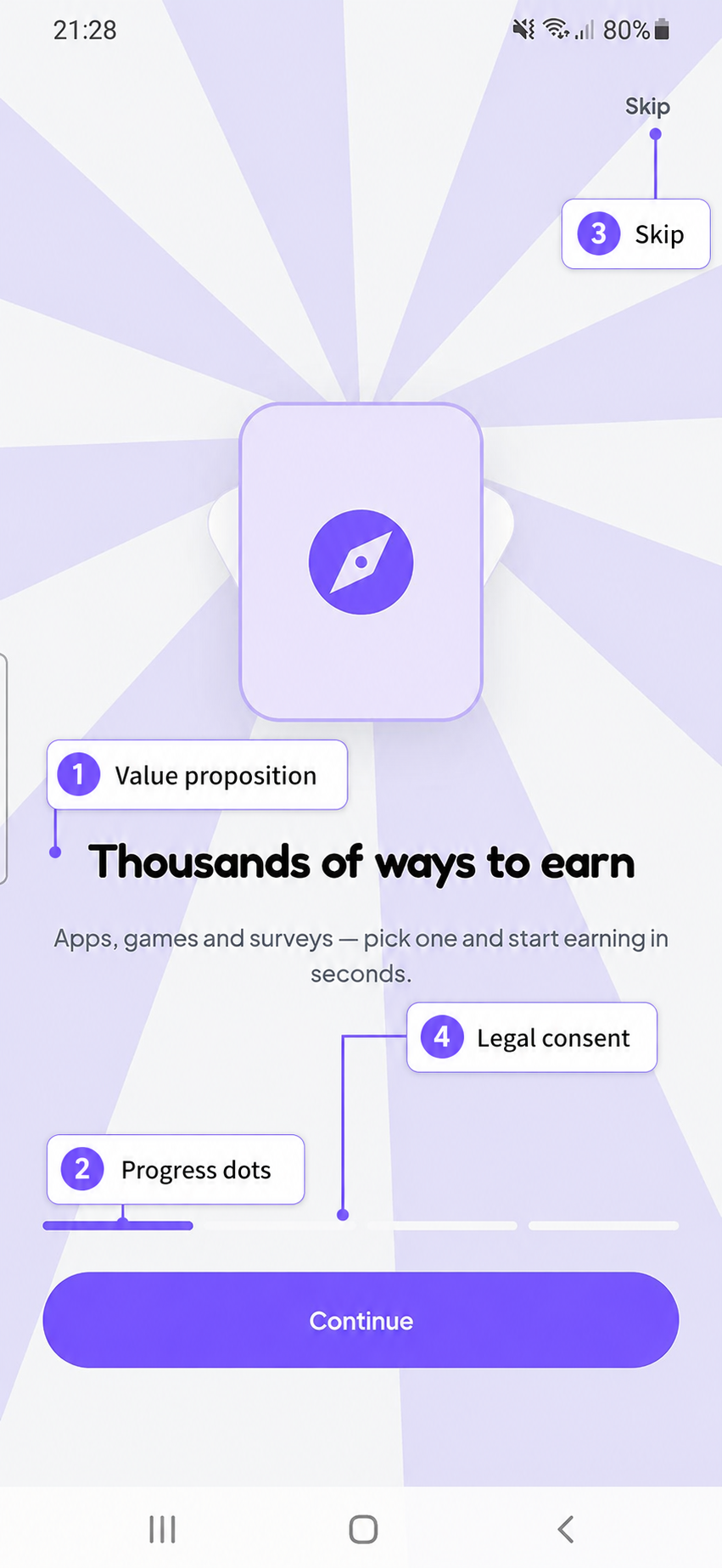 onboarding.png
Onboarding deck, first card
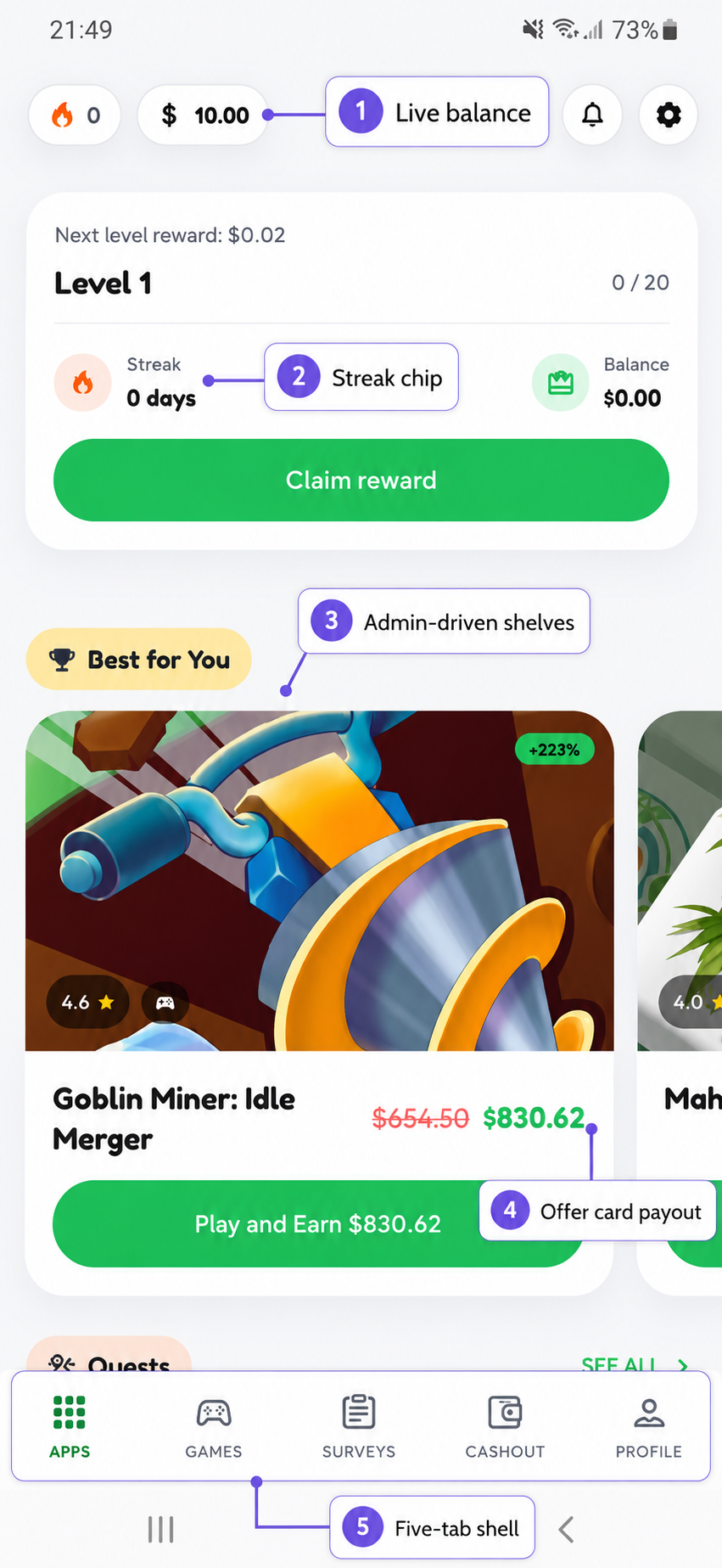 apps.png
Apps tab — sections, offers, balance
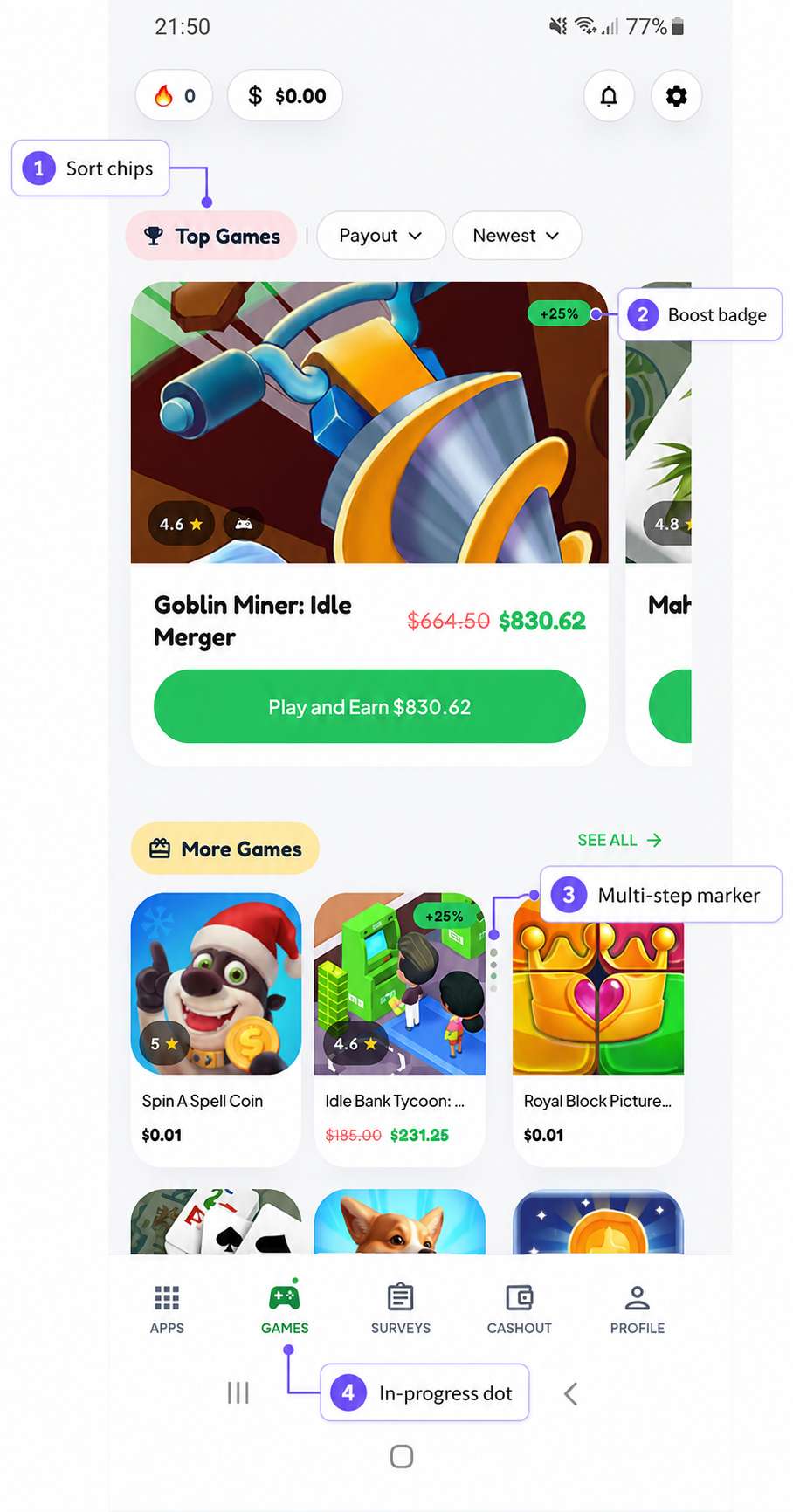 games.png
Games tab, sort chips visible
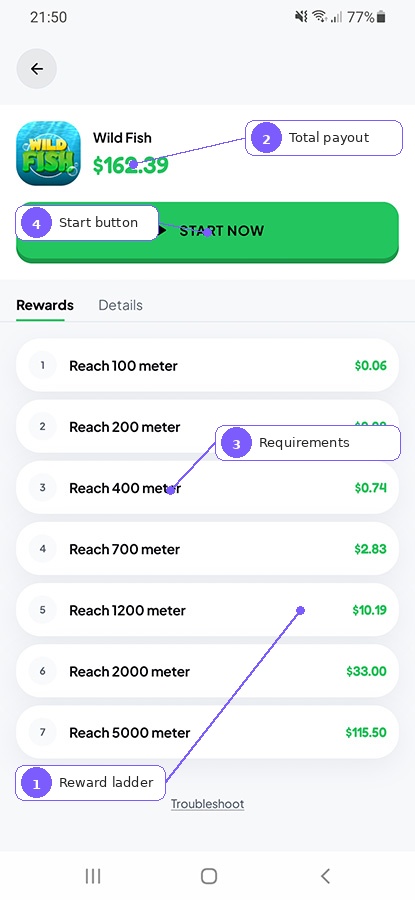 offer-detail.png
Multi-step reward ladder
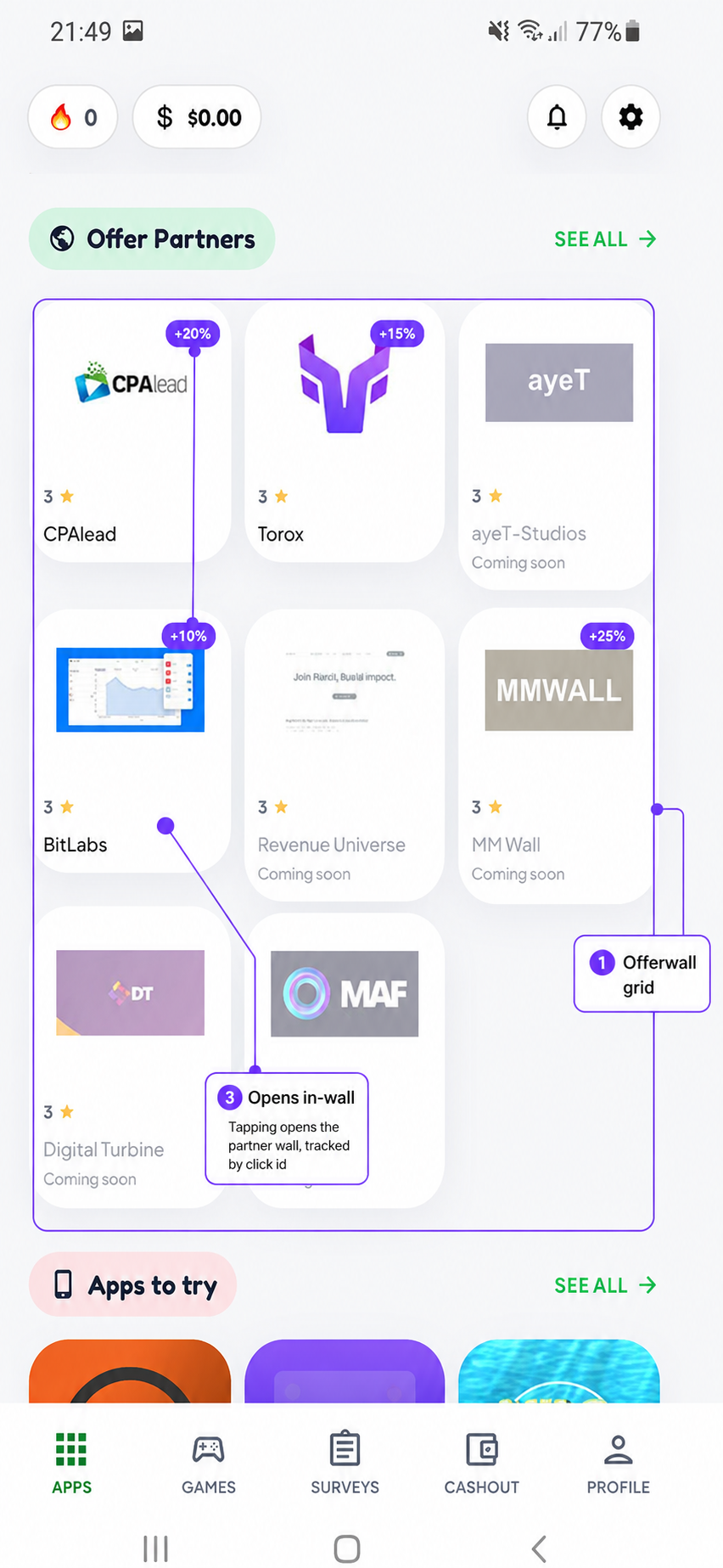 partners.png
Partners / offerwall grid
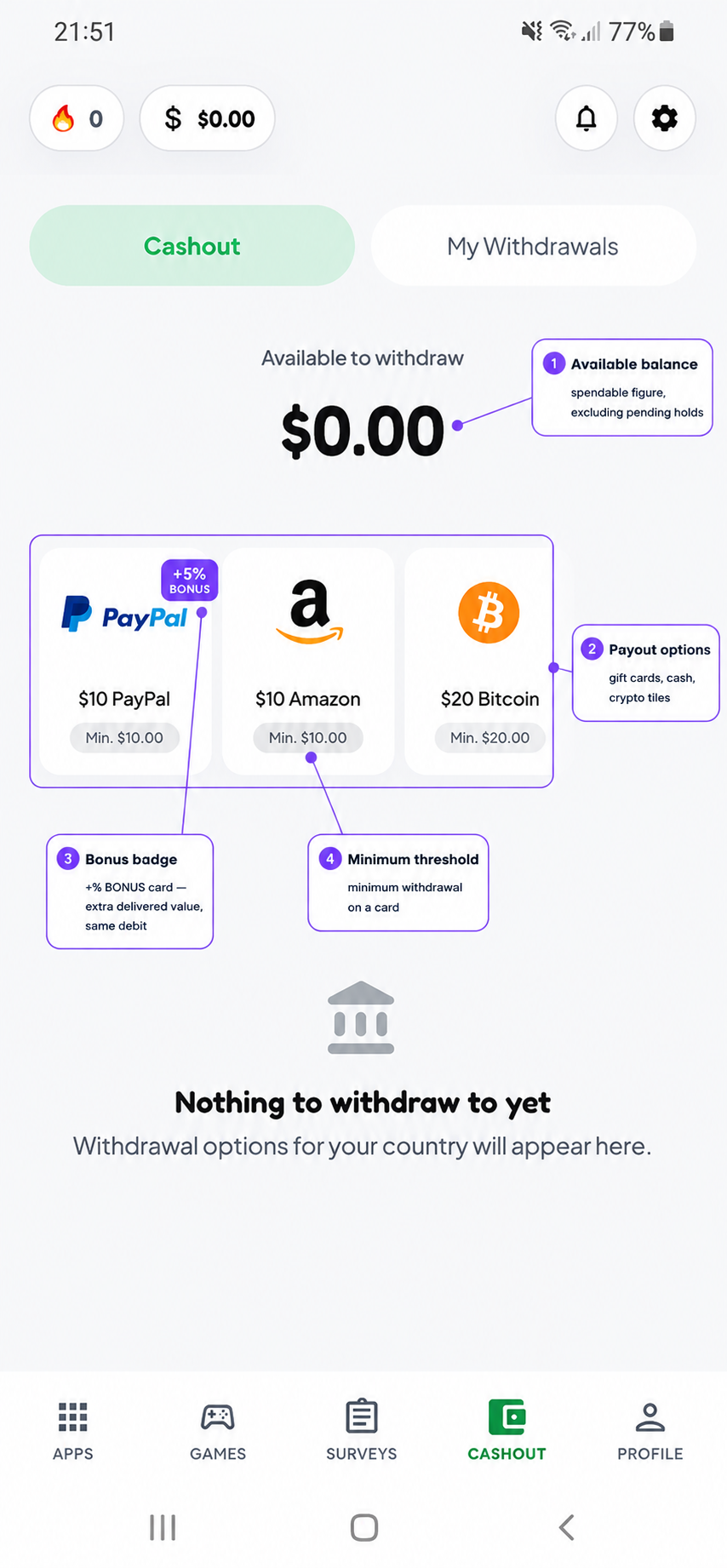 cashout.png
Cashout catalogue, boosted card
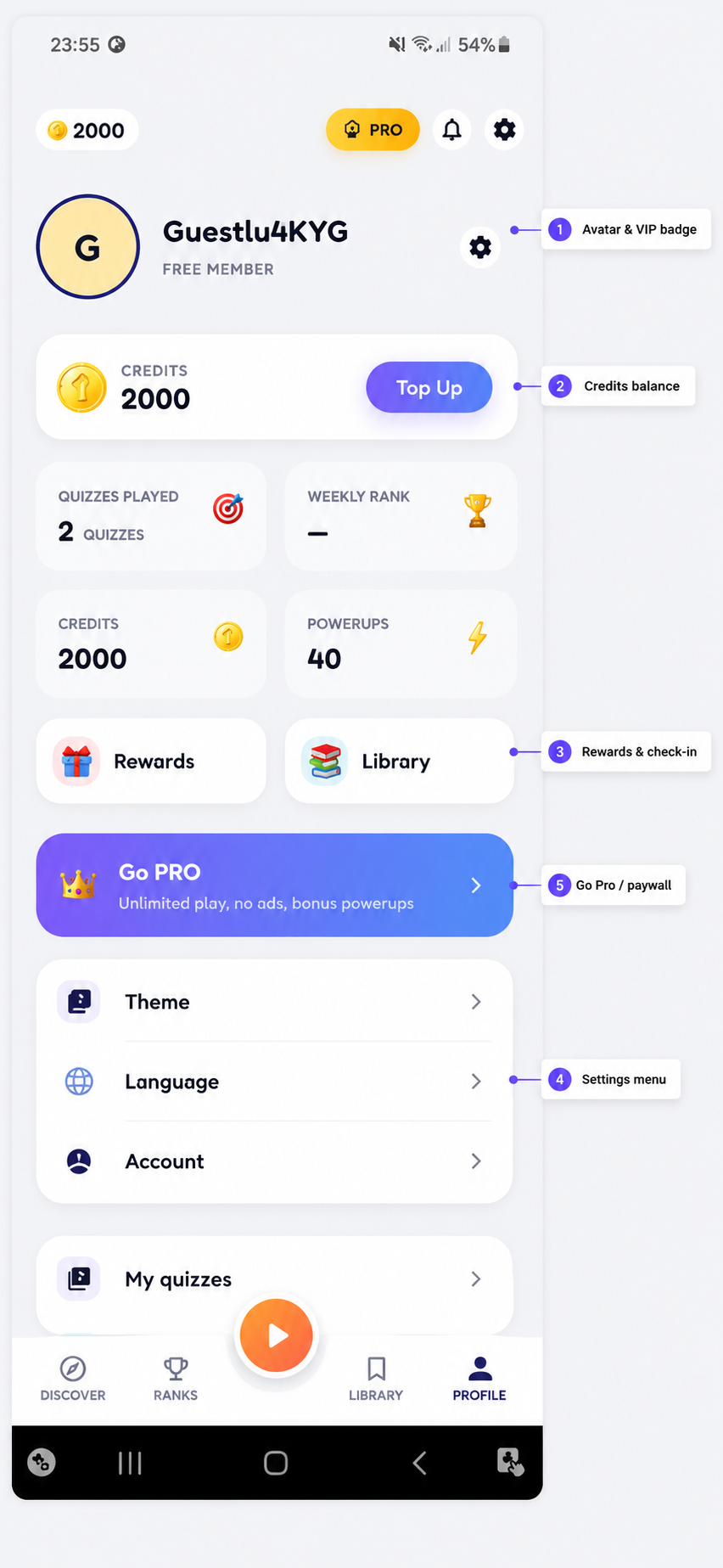 profile.png
Profile, level progress
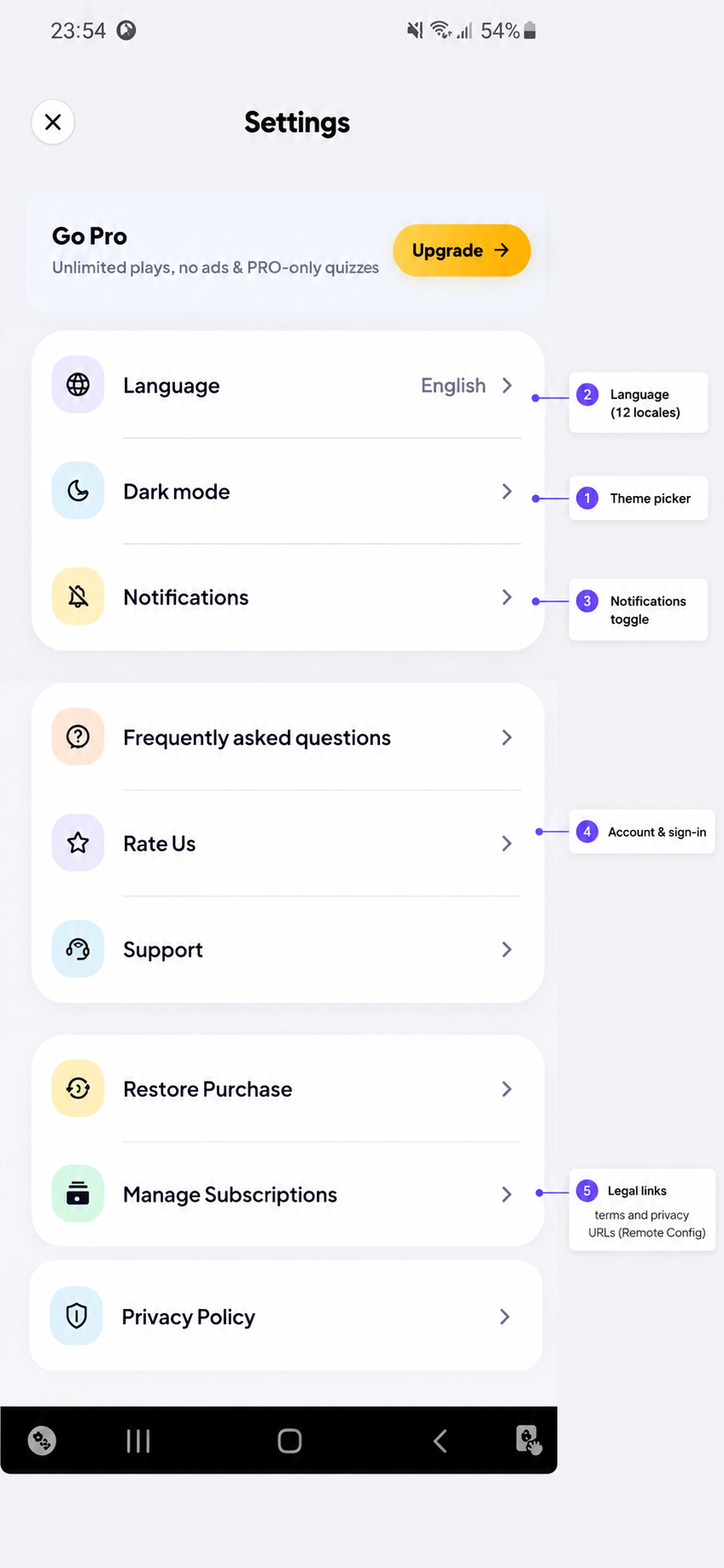 settings.png
Settings
assets/images/screenshots/ using the filename shown in each dashed box and it
appears automatically — no markup to edit. A box that is still dashed simply means that file is
not there yet.
Capture against a panel seeded with
php artisan db:seed --class=DemoSeeder,
otherwise the feeds are empty and the wallet reads zero.
Above them sits the persistent header, fed by one call to
GET /home:
- Balance chip — the withdrawable
availablefigure, formatted in the currency fromconfig.economy.currency_code. Tapping it selects the Cashout tab rather than pushing a route, so there is no back stack to unwind. - Streak chip — day count, and a claim indicator when today's streak reward is available. Tapping selects Profile.
- Notifications — unread count.
- Settings.
The header refetches every time the shell resumes, not once per process: a balance moves on screens the header cannot see — an offer that converted, a withdrawal that was requested, a quest that was claimed.
Tab badges are derived from the same payload: a count badge on Profile when quests are claimable, and a plain dot on Apps when offers are in progress (what matters is that something is unfinished, not how many).
Back behaviour: on any secondary tab, back returns to Apps. On Apps, back asks for a second press within two seconds before leaving the app.
1. Apps Tab
The default tab. An admin-built section stack sits above an infinite, filterable offer list.
- Sections come from
GET /home?screen=earn— carousels, grids, lists, banners, partner rows and hero blocks, in whatever order the panel says. A section with no items is omitted server-side, never rendered empty. - The list is
GET /offers?type=app, paginated, with sort chips for payout, new, popular, quick and rating, plus category and provider filters and search. - Payout display: when
original_payoutandboost_percentare present, the original is struck through and the boost badge renders. The app never computes a boost itself.
2. Games Tab
The same screen with type=game and screen=games. Apps, Games and
Surveys are one implementation with three configurations — building them as three screens would
have meant maintaining the same paging, sorting and section rendering three times over.
3. Surveys Tab
Backed by the dedicated GET /surveys endpoint rather than a type filter, with its
own narrower set of sort chips — a chip the server would reject is never rendered. Survey
partners are typically opened through their SDK or hosted wall rather than as individual
offers.
4. Cashout Tab
Two panes: Cashout (the catalogue) and My Withdrawals.
- Options arrive from
GET /cashout/optionsgrouped by brand, already filtered server-side to what this user can use — geo-blocked and out-of-stock rows are dropped, and a group that empties is dropped with them. The app should never show a card that errors on tap. - A card is either a fixed denomination or a range with a
minimum. Bonus and fee percentages are null rather than zero when absent, so the
+30% BONUSpill renders on presence, not on a magic value. - The payout field is labelled by the server (
target_label: "Email address", "Wallet address", "Phone number"), so a new payout rail does not need an app release to be labelled correctly. - Requesting a withdrawal holds the money immediately —
availabledrops at once,cash_balanceonly when it is paid. - A rejected request returns every unmet rule at once in
error.fields.reasons, so the user is not told about one blocker at a time. - Pending requests can be cancelled, which releases the hold.
5. Profile Tab
Identity, level progress and everything that is not an offer:
- Balance summary and a link into the full transaction ledger
(
GET /wallet/transactions, filterable by type) - Quests and streak — both claimed, never auto-credited
- Levels — progress and what the next level unlocks
- Promo codes — redeemed in a sheet, rate-limited separately
- Refer a friend — code, share sheet, friend list and referral earnings
- My account, Language, Settings, Sign out
Settings itself carries dark mode, sound effects, push toggle, language, the legal/help links
from config.links (a row is hidden when its URL is null), rate-this-app, sign-in
for guests, and account deletion. Deleting an account soft-deletes it server-side —
financial history is retained — and drops the user back to a fresh anonymous
session rather than a sign-in wall.
Offer Detail & My Offers
Offer detail (GET /offers/{id}) adds two things the list does not
carry: the reward ladder (steps — each with its own payout and
completion criteria) and requirements (device, OS version, country, "new users
only"). A troubleshooting endpoint
(GET /offers/{id}/troubleshoot) backs the "I did this and wasn't paid" screen with
self-help steps and the offer's current status.
My Offers (GET /me/offers) splits into
in progress and completed, and is what the dot on the Apps tab refers to.
Partners lists every enabled offerwall
(GET /providers); opening one calls
POST /providers/{slug}/open and hands the result to the launcher registry.
💰 How Earning Works
Four ways money enters a wallet, and all four end in the same place — a ledger row.
| Source | How it is verified | Who credits it |
|---|---|---|
| Offer / offerwall conversion | Partner postback carrying the click id | Server, on postback |
| Survey completion | Partner postback | Server, on postback |
| Usage-verified offer | On-device play time, posted by the app, judged by the server | Server, on report |
| Rewarded video | Ad network reward callback + daily cap | Server |
| Quest / streak / level / referral / promo code | Server-side rules | Server, on claim |
POST /offers/{id}/click, which returns {click_id, url}. The app opens
that URL — in a Chrome Custom Tab, exactly as given. The click id is embedded
in it as the partner's sub-id, and their postback returns it. Hand the URL to a Play Store
intent and the query string is dropped, the postback arrives with no sub-id, and the user is
never paid.
Money rules that matter
- Spend against
available, notcash_balance.pendingis money that has arrived but is not yet withdrawable; a requested withdrawal is already held out ofavailable. - Balances are
decimal(14,6)handled by bcmath. Never floats —0.1 + 0.2 !== 0.3, and a cent lost per conversion is real money. - Nothing writes a balance except
WalletService. It locks the wallet row and writes the matchingwallet_transactionsentry in the same database transaction. - Ledger and audit rows are immutable. A mistake is corrected with a compensating entry; the models throw on update and delete.
wallet:verifyruns hourly and exits non-zero if any balance disagrees with its ledger. Wire it to alerting — it is the canary for a balance written outsideWalletService.
Usage-Verified Offers
For offers you run yourself (no partner postback to rely on), CashLoop can verify that the user actually used the installed app. This is the only feature that needs a sensitive permission.
- An offer is marked
verification_mode = usagein the panel with a target package name and a play-time threshold. - When the user opens it, the launcher registry starts watching before anything opens — the click time is the lower bound of the usage query, and a bound set afterwards would miss the session the user just played.
- The app asks for Usage access (
PACKAGE_USAGE_STATS), which is a Settings screen the user must visit; it is requested in context, when the first such offer is opened, not at launch. - On the next app resume,
UsageReporterqueriesUsageStatsManagerfor every watched package and posts the result toPOST /me/offers/{id}/usage. - The server decides whether it qualifies and credits accordingly. The app measures, posts and acts only on the verdict — it never decides that something was earned.
- Anything credited that the user has not seen yet is shown as a celebration on the next resume; multiple offers are summed into one dialog rather than stacking.
UsageStatsManager is a
historical store: one query covers the whole window since the click. A user who installs a game,
plays it for a week and only then reopens CashLoop is credited in full on that single query. A
periodic background job would change nothing about who gets paid — only how early the
notification arrives — at the cost of a WorkManager dependency and a wakeup budget.
PACKAGE_USAGE_STATS is a sensitive permission. Declare
it honestly in the Data safety form, explain it in your listing, and disable usage-verified
offers entirely if you do not intend to run first-party offers — the permission is only ever
exercised for offers whose verification_mode is usage.
🗺️ System Flowcharts
1. Master system architecture
┌──────────────────────────────────────────────────────────────┐
│                    CashLoop Android (Compose)                │
│   Hilt · Retrofit · kotlinx.serialization · DataStore Proto  │
└───────┬───────────────┬────────────────────┬─────────────────┘
        │ REST          │ SDKs               │ Firebase
        ▼               ▼                    ▼
┌────────────────┐ ┌──────────────────┐ ┌──────────────────────┐
│  Laravel 13    │ │ Offerwall SDKs   │ │ Auth (identity)      │
│  /api/v1       │ │ BitLabs · ayeT   │ │ Cloud Messaging      │
│                │ │ MyChips · DT     │ │ Remote Config        │
│  MySQL 8 —     │ └────────┬─────────┘ └──────────────────────┘
│  source of     │          │ user completes an offer
│  truth for     │          ▼
│  EVERYTHING    │ ┌──────────────────┐
│  financial     │◀│ Partner postback │  server-to-server only
└───────┬────────┘ └──────────────────┘
        │
        ▼
  wallet_transactions  →  quests · levels · referrals  →  cashout
There is no second datastore and no realtime database. MySQL is the source of truth for every balance, conversion and withdrawal; Firebase supplies identity, push and one config key.
2. Boot & authentication
firebase_uid, so a different server-side account. The app
then claims the guest's balance through POST /auth/relink, which moves cash, coins
and progression across and retires the guest.
The app sends the guest's own refresh token as proof it held that session. A bare user id would let any signed-in caller name someone else's account and sweep its balance, so the server refuses a merge it cannot tie to a session the caller actually owned. The token is consumed either way, so a replay cannot pay twice. See POST /auth/relink.
3. Click → postback → wallet
4. Cashout flow
5. Data ownership (what lives where)
| Data | Home | Why |
|---|---|---|
| Users, offers, providers, wallets, conversions, cashouts, quests, levels | MySQL (Laravel) | Durable, reportable, auditable, admin-editable |
| Identity (uid, providers linked) | Firebase Auth | Anonymous → real upgrade in place is what preserves guest balances |
| API origin | Firebase Remote Config | The one thing that must be changeable before the app can reach the API at all |
| Everything else configurable | GET /config | One source, versioned with the backend, no console drift |
| Partner credentials & postback secrets | provider_settings (encrypted) | Never in the binary; rotating a key is a panel edit |
| Theme, sound, language, onboarding-seen | On-device DataStore | Device preferences, not account state |
| Pending usage-verified offers | On-device DataStore | Watch list only — the server still judges every report |
🎨 Branding and Customization
Rebranding the app from scratch
app_name in res/values/strings.xml (and each values-xx/ you want localised).applicationId and namespace in app/build.gradle.kts. Then recreate the Firebase Android app, replace google-services.json, regenerate the Google OAuth client, update the Facebook Android package, and use the new id in Play Console.res → New → Image Asset. Regenerates every density plus the adaptive layers.ArcadePresets.SELECTED, or add a tenth preset.releaseApiBaseUrl in app/build.gradle.kts, plus the Remote Config api_base_url if you want to steer already-installed builds.APP_NAME in the Laravel .env, logo and colours under /admin/settings/general, and the legal/help pages under /admin/content/pages./admin/settings/app. The app reads all of them; nothing is hardcoded.Home sections (admin-driven)
Every feed screen is a stack of sections defined at /admin/app-sections. A section is
a row in app_sections and looks like this on the wire:
{
  "key": "best_for_you",
  "title": "Best for You",
  "subtitle": null,
  "icon": null,
  "layout": "carousel",
  "data_source": "featured_offers",
  "show_view_all": true,
  "view_all_filters": {"sort": "payout"},
  "items": [ /* offers, providers, quests or banners */ ]
}| Field | Accepted values |
|---|---|
screen | home, earn (Apps), games, surveys, more |
layout | carousel, grid, list, banner, partners, hero |
data_source | featured_offers, offers_by_type, surveys, providers, quests, banners, custom_ids |
view_all_filters | Any query the /offers endpoint accepts — passed straight back when the user taps "View all" |
data_source added to the server after a build shipped renders nothing
rather than guessing — drawing the wrong card with real money on it is worse than drawing no
card. Likewise a single malformed item is dropped, not fatal: one bad offer must not blank a
whole shelf.
Android customization cheat sheet
| I want to change… | Where | Needs a release? |
|---|---|---|
| Colours / theme | ArcadePresets.SELECTED | Yes |
| App name / icon | strings.xml · mipmap-* | Yes |
| Which tabs exist | Panel → config.features | No |
| Feed sections, order, titles, banners | Panel → App sections | No |
| Offers, categories, payouts, boosts | Panel → Offers / Engagement | No |
| Cashout catalogue | Panel → Cashouts | No |
| Ad networks and unit ids | Panel → App settings | No |
| Legal / help pages | Panel → Content pages | No |
| Backend origin | Remote Config api_base_url | No |
| Partner credentials | Panel → Providers | No |
| A new language's UI strings | res/values-xx/strings.xml | Yes |
🟢 Getting Started
What you are setting up, and why
CashLoop is two deployables plus a Firebase project. The app cannot do anything on its own: it holds no content, no economy and no balances. Getting it running means standing up the backend first, giving the app a way to reach it, and giving both sides the same Firebase identity.
The 6 stages at a glance
| # | Stage | You end up with |
|---|---|---|
| 1 | Android project opens and builds | A debug APK on an emulator |
| 2 | Firebase project | google-services.json + a service account JSON |
| 3 | Remote Config | One published key: api_base_url |
| 4 | Laravel panel running locally | Admin login + a reachable /api/v1/config |
| 5 | Laravel deployed | An HTTPS origin, a queue worker and one cron entry |
| 6 | Partners configured | Postback URLs live, one partner in testing |
/api/v1/config returns JSON in your browser.
🚀 Run the App From Scratch — Complete Setup Guide
📋 Prerequisites
| For | You need |
|---|---|
| Android | Android Studio (Ladybug+), JDK 17+, Android SDK 36, an emulator or device on API 26+ |
| Backend | PHP 8.3+, Composer 2, Node 20+, MySQL 8 or MariaDB 10.3+ |
| PHP extensions | bcmath (money arithmetic — not optional), ctype, curl, dom, fileinfo, gd, mbstring, openssl, pdo_mysql, tokenizer, xml, zip |
| Accounts | Firebase, Google Play Console, AdMob (optional), OneSignal (optional), and a publisher account with each offerwall partner you intend to run |
bcmath before anything else. Without it every money
operation fails. On MAMP/XAMPP it is usually present; on a fresh Ubuntu box it is
php8.3-bcmath, installed separately.
php -v            # 8.3+
php -m | grep -E 'bcmath|pdo_mysql|gd|mbstring'
composer -V
node -v           # 20+
mysql --version   # 8+
java -version     # 17+
🔧 Step 1 — Android Project Setup
cashloop-android/ folder (not a subfolder). Let Gradle sync finish; the first sync downloads the toolchain and every SDK.app/build.gradle.kts → applicationId / namespace. Change it now if you are rebranding — changing it later means redoing Firebase, Google OAuth and Facebook.http://10.0.2.2:8000/). Physical device: ./gradlew :app:installDebug -Pcashloop.apiBaseUrl=http://192.168.1.x:8000/ or a tunnel URL. Remember the trailing slash../gradlew :app:installDebug. At this point the app should launch and show the splash; empty feeds are expected until the backend is up.🔥 Step 2 — Firebase Project Setup
applicationId. Add debug and release SHA-1 and SHA-256 fingerprints:
# Debug (bundled keystore)
keytool -list -v -keystore debug.keystore -alias androiddebugkey \
        -storepass android -keypass android

# Your release keystore
keytool -list -v -keystore /path/to/release.jks -alias <your-alias>google-services.json → app/google-services.json.- Authentication → Sign-in method → enable Anonymous (required), Email/Password, Google, Facebook
- Cloud Messaging
- Remote Config
storage/app/firebase/service-account.json in the Laravel project and reference it from FIREBASE_CREDENTIALS. This file is a secret — never commit it.google-services.json you downloaded, and the Gradle
plugin turns it into default_web_client_id at build time.
If Google Sign-In returns
DEVELOPER_ERROR, the usual causes are a
google-services.json from a different project, or missing SHA fingerprints — not a
string to edit.
⚙️ Step 3 — Firebase Remote Config
CashLoop uses exactly one Remote Config parameter. Everything else that used to
live in a console is served by GET /api/v1/config, so there is only one place a
value can be wrong.
| Parameter | Type | Value | Required? |
|---|---|---|---|
api_base_url | String | Your API origin, with a trailing slash — e.g. https://panel.example.com/ | Optional — blank means "use the build's baked-in origin" |
- Firebase Console → Remote Config → Create configuration.
- Parameter key
api_base_url, value = your origin with the trailing slash. - Publish changes. An unpublished parameter does not exist as far as the app is concerned.
BuildConfig.API_BASE_URL — and
nothing else.
🗄️ Step 4 — Laravel Admin Panel Setup (Local)
cd cashloop-admin-panel
composer install
npm installmysql -u root -p -e "CREATE DATABASE cashloopdb CHARACTER SET utf8mb4 COLLATE utf8mb4_unicode_ci;".env.
cp .env.example .env
php artisan key:generate
php artisan jwt:secretAPP_NAME="CashLoop"
APP_URL=http://127.0.0.1:8000
DB_DATABASE=cashloopdb
DB_USERNAME=root
DB_PASSWORD=root
# Seeded admin — set a real password BEFORE seeding.
ADMIN_EMAIL=you@your-domain
ADMIN_PASSWORD=<a real password>
ADMIN_NAME="CashLoop Admin"
# Firebase service account JSON, relative to the project root
FIREBASE_CREDENTIALS=storage/app/firebase/service-account.json
FIREBASE_PROJECT=app
SESSION_DRIVER=database
QUEUE_CONNECTION=sync # database or redis under loadphp artisan migrate:fresh --seed # schema + core data
php artisan storage:link # offer icons, logos, banners
# Optional: demo users, offers, conversions, promo codes
php artisan db:seed --class=DemoSeedernpm run dev # Vite, in one terminal
php artisan serve # http://127.0.0.1:8000, in another/en/web-login with the credentials from .env.curl -s http://127.0.0.1:8000/api/v1/config | head -c 400{"success":true,"data":{"config":{.... If you get HTML, the route
is not registered or the app is erroring — check storage/logs/laravel.log.php artisan config:cache is safe on this project. Every
configuration read goes through a config/*.php file, and
ConfigurationSafetyTest fails the build if a raw env() call appears
outside one. (If you have used the older quiz-app panel, this is the opposite of what that
codebase required.)
📊 Step 5 — Database (Migrations & Seeders)
What the migrations create
| Migration group | Covers |
|---|---|
| Reference, roles, users, auth tokens | Countries, currencies, locales, staff roles, users, JWT refresh tokens |
| Queue, cache, settings, content, support | Framework tables, app settings, CMS pages, email templates, tickets |
| Providers | providers, provider_settings (encrypted), placements, geo rules |
| Offers | Offers, categories, reward steps, requirements, clicks |
| Wallet | wallets, wallet_transactions — the ledger |
| Conversions | Conversions and postback_logs |
| Cashout | Cashout catalogue, categories, requests |
| Engagement | Quests, levels, streak rewards, promo codes, boosts, referrals |
| App layout | app_sections, banners |
| Integrity | Fraud rules, user flags, audit logs |
| Usage verification | Adds verification_mode, target package and threshold to offers |
Seeders
| Seeder | What it puts in | Production? |
|---|---|---|
CoreSeeder | Countries, currencies, locales, roles, the admin user, settings, offer categories, providers, cashout catalogue, engagement defaults, fraud rules, pages, email templates, app sections | Yes — this is the production seeder |
DemoSeeder | Demo users, offers, conversions and promo codes for screenshots and manual testing | Never. It refuses to run in production — do not rely on that |
CpaLeadOfferSeeder, ToroxOfferSeeder | Sample offers shaped like each partner's real feed | Development only |
# Fresh local rebuild
composer refresh          # migrate:fresh --seed
composer refresh-demo     # …plus demo fixtures

# Production
php artisan migrate --force
php artisan db:seed --class=CoreSeeder --force
Verify
php artisan tinker --execute="echo App\Models\Provider::count().' providers, '
  .App\Models\Offer::count().' offers, '
  .App\Models\User::count().' users';"

php artisan wallet:verify     # must exit 0
🔐 Step 6 — Firebase Auth Bridge
Firebase owns identity; the API owns everything else. The bridge is one endpoint.
FIREBASE_CREDENTIALS=storage/app/firebase/service-account.json. This is what lets the server verify an incoming Firebase ID token.strings.xml, and paste the Facebook OAuth redirect Firebase gives you into the Meta app's Facebook Login settings.google-services.json and the Gradle plugin generates default_web_client_id from it. What you must do is register the SHA-1 and SHA-256 fingerprints in Firebase for both debug and release, then re-download google-services.json.curl -X POST http://127.0.0.1:8000/api/v1/auth/firebase \
-H "Content-Type: application/json" \
-H "X-Platform: android" -H "X-App-Version: 2.0" \
-d '{"id_token":"<a real Firebase ID token>"}'E_UNAUTHENTICATED — which is the correct answer, and proves the bridge is
wired.firebase_uid — and therefore the server-side
account, balance and streak — is unchanged. There is no merge step because there is nothing to
merge.
POST /auth/relink with the guest's refresh token, and the server moves the cash,
coins and progression onto the account just signed in to. See
POST /auth/relink.
🚀 Step 7 — Deploy Laravel to Production
git clone <repo-url> /var/www/cashloop && cd /var/www/cashloop

composer install --no-dev --optimize-autoloader
npm ci && npm run build

cp .env.example .env
php artisan key:generate
php artisan jwt:secret

php artisan migrate --force
php artisan db:seed --class=CoreSeeder --force
php artisan storage:link

php artisan config:cache && php artisan route:cache \
  && php artisan view:cache && php artisan event:cache
Production .env checklist
APP_ENV=production
APP_DEBUG=false                 # non-negotiable
APP_URL=https://your-domain

ADMIN_EMAIL=you@your-domain
ADMIN_PASSWORD=<12+ chars, not a common default>   # see the note below

FIREBASE_CREDENTIALS=storage/app/firebase/service-account.json
QUEUE_CONNECTION=database
SESSION_DRIVER=database
ONESIGNAL_APP_ID=…
ONESIGNAL_REST_API_KEY=…
ADMIN_PASSWORD is not optional and has no default.
AdminUserSeeder skips creating the admin — with a warning — if it is blank, is one
of the common defaults (password, admin, changeme, …), or
is shorter than 12 characters. That applies in every environment, not only production:
a local seed gets deployed, and this is the account that approves withdrawals.
If
php artisan migrate --seed finishes but you cannot sign in, this is why — read
the seeder's output.
public/build/ throws
"Unable to locate file in Vite manifest" and every page returns 500 —
not a missing stylesheet.
npm install
npm run buildpublic/build/ you can skip this, but re-run it
after changing anything under resources/css/ or resources/js/.
Permissions
chown -R www-data:www-data storage bootstrap/cache
chmod -R 775 storage bootstrap/cache
Queues
Conversion crediting, referral payouts and push notifications run through event listeners. With
QUEUE_CONNECTION=sync they run inline — fine at low volume and simplest to debug —
but move to database or redis under load.
[program:cashloop-worker]
process_name=%(program_name)s_%(process_num)02d
command=php /var/www/cashloop/artisan queue:work --sleep=3 --tries=3 --max-time=3600
autostart=true
autorestart=true
user=www-data
numprocs=2
redirect_stderr=true
stdout_logfile=/var/www/cashloop/storage/logs/worker.log
stopwaitsecs=3600
Scheduler — one cron entry, and it is not optional
* * * * * cd /var/www/cashloop && php artisan schedule:run >> /dev/null 2>&1| Command | When | Why it matters |
|---|---|---|
wallet:verify | hourly | Re-sums every ledger. Exits non-zero on drift — wire it to alerting |
offers:expire | hourly | Stops the feed advertising offers that can no longer pay out |
logs:prune | 03:30 daily | Trims postback logs and unconverted clicks. Conversions, ledger, cashouts and audit logs are never pruned |
auth:clear-resets, queue:prune-batches | daily | Framework housekeeping |
Shared hosting (cPanel / Hostinger / Namecheap)
- Upload the project outside
public_html; point the domain's document root at the project'spublic/directory. - Set the PHP version to 8.3 and enable
bcmath,pdo_mysql,gd,zip,fileinfo. - Create the database and user in cPanel, then run the artisan commands over SSH (or the host's terminal). Hosts with no SSH are a poor fit — you cannot run migrations or a queue worker.
- Add the scheduler cron entry through the cPanel Cron Jobs UI.
- Use
QUEUE_CONNECTION=syncif you have no way to keep a worker alive.
Cloud / VPS
A Linux host with PHP 8.3, nginx, MySQL 8 and Supervisor is the intended target: nginx serving
public/, PHP-FPM, Supervisor running the queue worker, and system cron running the
scheduler. Managed platforms (Forge, Ploi, Vapor) work with no changes.
Routine deploys
php artisan down --render="maintenance"
git pull
composer install --no-dev --optimize-autoloader
npm ci && npm run build
php artisan migrate --force
php artisan config:cache && php artisan route:cache && php artisan view:cache && php artisan event:cache
php artisan queue:restart
php artisan up
php artisan queue:restart is not optional — workers hold the old code in memory
until told to restart. And after any .env change:
php artisan config:clear && php artisan config:cache.
Backups, in order of "cannot be reconstructed"
wallet_transactions— the ledger. Balances are derived from it; lose it and you cannot prove what anyone is owed.conversions,cashout_requests— what was earned and what was paid.audit_logs,user_flags— who decided what.storage/app/public— uploaded icons, logos, banners.- Everything else is recoverable from migrations, seeders and partner feeds.
🔁 Step 8 — Partner Postbacks
Each partner gets one URL:
https://your-domain/api/postback/{slug}Copy it from the partner's edit screen in the panel, which also shows the query template to paste into the partner's dashboard. The slug selects the adapter, and the adapter owns the IP allowlist and signature check. There is no session or token auth on this route — partners cannot carry one — so rate limits are keyed per provider, and one misconfigured partner cannot exhaust everyone else's budget.
Before switching a partner to active
/admin/providers/{id}/edit. Secrets are encrypted at rest.postback_ip_allowlist. With neither a secret nor an allowlist the adapter fails closed and rejects everything — deliberately.no_secret_and_no_ip_allowlist. That is the whole point: an open postback URL is an
open cash register for anyone who learns it. If a partner is not crediting, check the logs for
that reason before anything else.
BitLabs and Torox are stricter still — both sign every callback, so an IP allowlist alone is not accepted for them.
Seeding credentials from .env (optional)
The panel is the authority for provider settings, but ProviderSeeder will write an
initial value on first run from these, so a fresh deploy can come up already configured. Once a
setting exists, re-seeding leaves it alone — changing it here later does nothing.
# CPAlead — its postback carries a `password` parameter rather than a signature.
# Set this OR CPALEAD_POSTBACK_IPS, or CPAlead postbacks are rejected.
CPALEAD_WALL_SLUG=
CPALEAD_PUBLISHER_ID=
CPALEAD_POSTBACK_PASSWORD=
CPALEAD_POSTBACK_IPS=
CPALEAD_COUNTRIES=TR,US,DE,GB

# BitLabs — every callback is HMAC-signed, so the secret is mandatory.
BITLABS_APP_TOKEN=
BITLABS_APP_SECRET=

# Torox — every postback is signed; the placement key is mandatory.
TOROX_APP_ID=
TOROX_PUB_ID=
TOROX_TOKEN=
TOROX_POSTBACK_IPS=44.212.211.226
Leave them blank and the seeder writes nothing, which is the correct behaviour for a production seed — a partner with no credentials simply never credits anyone.
Adding a partner is data, not code
Credentials live in provider_settings, dialect lives in an adapter class, and a
partner with neither falls back to the config-driven
GenericOfferwallAdapter. Dedicated adapters ship for BitLabs, CPAlead and Torox.
Write a new adapter only when a partner's postback shape cannot be described in settings.
🔗 Step 9 — Third-Party Services (Quick Setup)
| Service | Required? | What you set, and where |
|---|---|---|
| Firebase | Required | google-services.json in the app; service account JSON on the server |
| Offerwall partners | Required to earn anything | Credentials in /admin/providers; postback URL in the partner dashboard |
| Google AdMob | Optional | admob_app_id in strings.xml; unit ids in /admin/settings/app |
| Unity Ads | Optional | Game project id and placements in /admin/settings/app |
| OneSignal | Optional | App id served via config.push; REST key in Laravel .env |
| Google Sign-In | Recommended | Generated from google-services.json; you add SHA fingerprints |
| Facebook Login | Optional | App id, client token, key hashes |
| Cloudflare Turnstile | Optional | TURNSTILE_SITE_KEY / TURNSTILE_SECRET_KEY — protects the web forms, not the mobile API |
| SMTP | Recommended | /admin/settings/smtp — password resets and ticket replies |
| Object storage | Optional | S3/Wasabi/Storj/B2/Spaces credentials in .env; local public disk is the default |
Details for each in Integrations.
▶️ Step 10 — Run the App
# 1. Backend
cd cashloop-admin-panel
php artisan serve            # http://127.0.0.1:8000
npm run dev                  # separate terminal

# 2. App — emulator, default origin (10.0.2.2 → your host)
cd cashloop-android
./gradlew :app:installDebug

# 2b. App — physical device
./gradlew :app:installDebug -Pcashloop.apiBaseUrl=http://192.168.1.42:8000/127.0.0.1 or 10.0.2.2.
Use your machine's LAN IP or a tunnel, and remember cleartext HTTP is disabled outside the
emulator default — a tunnel (HTTPS) is the path of least resistance.
✅ Verify Setup
Work down this list. Each line depends on the ones above it, so stop at the first failure.
| # | Check | Expected |
|---|---|---|
| 1 | curl .../api/v1/config | {"success":true,…} |
| 2 | Admin login at /en/web-login | Dashboard loads |
| 3 | php artisan wallet:verify | Exit code 0 |
| 4 | App launches past the splash | No gate screen, no infinite spinner |
| 5 | Apps tab shows offers | Requires at least one active provider with active offers |
| 6 | Header shows a balance | Signup bonus applied if configured |
| 7 | Tapping an offer opens a Custom Tab | URL contains a click id |
| 8 | Panel → Offers → Clicks | The click you just made is recorded |
| 9 | Fire a test postback | Conversion appears; wallet and ledger both move |
| 10 | Cashout tab | Catalogue renders; a below-minimum request lists every unmet rule |
| 11 | Quests / streak | Claim credits the wallet and clears the badge |
| 12 | Flip a feature flag off in the panel, relaunch | That tab is gone, not greyed out |
📡 Remote Config Reference
| Key | Type | Default in app | Meaning |
|---|---|---|---|
api_base_url | String | "" | Origin of the CashLoop API, with a trailing slash. Blank means "use BuildConfig.API_BASE_URL" — never "no API". |
That is the entire list, on purpose. Remote Config carries only what has to be settable
before the app can reach the API at all — which is the API's own origin. Product
configuration comes from GET /api/v1/config, where it is versioned alongside the
backend that produces it.
| Setting | Value | Why |
|---|---|---|
| Fetch timeout | 10 s | Failure is not fatal — the build default is used |
| Minimum fetch interval (debug) | 0 s | A key you just published reaches the app immediately |
| Minimum fetch interval (release) | 3600 s | These change per release, not per minute; a shorter window only burns quota |
🔌 Mobile API v1 Reference
Base URL: https://<host>/api/v1
/api/v2 rather than mutating these shapes. This
section is the authoritative copy of the contract.
Envelope
Every response — success or failure — has the same shape:
{
  "success": true,
  "data": { },
  "meta": { "page": 1, "per_page": 20, "total": 124, "last_page": 7, "has_more": true },
  "error": null
}
{
"success": false,
"data": null,
"meta": null,
"error": { "code": "E_CASHOUT_NOT_ALLOWED", "message": "…", "fields": { "reasons": ["…"] } }
}error.code is stable and is what the client switches on. error.message
is English and intended for logs — the app shows its own localised copy per code.
Error codes
| Code | Meaning |
|---|---|
E_INVALID_INPUT | Validation failed; fields holds the per-field messages |
E_UNAUTHENTICATED | Missing/expired token — refresh, then re-auth |
E_FORBIDDEN | Authenticated but not allowed |
E_NOT_FOUND | No such resource |
E_OFFER_UNAVAILABLE | Offer is paused, expired, capped or wrong platform |
E_GEO_BLOCKED | Not available in the user's country |
E_INSUFFICIENT_BALANCE | Not enough available balance |
E_CASHOUT_NOT_ALLOWED | One or more withdrawal rules failed; see fields.reasons |
E_PROMO_CODE_INVALID | Unknown, expired, or already-used code |
E_ALREADY_CLAIMED | Streak or quest reward already taken |
E_ACCOUNT_BLOCKED | Account suspended; message carries the reason |
E_MAINTENANCE | Server maintenance |
E_RATE_LIMITED | Too many requests |
E_SERVER_ERROR | Unexpected failure |
Headers
| Header | Required | Purpose |
|---|---|---|
Authorization: Bearer <jwt> | On protected routes | The token from /auth/firebase |
X-Platform | Recommended | android | ios | web — drives targeting |
X-App-Version | Recommended | Force-update gate and section version gating |
X-Device-Id | Recommended | Advertising id; used for tracking macros and fraud signals |
X-Locale | Optional | Stored on the user |
X-Device-Model, X-OS-Version | Optional | Attached to support tickets |
The server keeps the user's device record current from these headers, so there is no separate
"update device" call. On Android they are added by
api/interceptors/ContextHeaderInterceptor.kt.
Public endpoints
| Method | Path | Notes |
|---|---|---|
| GET | /config | Economy, feature flags, ad units, force-update gate. Fetch before sign-in |
| GET | /locales | |
| GET | /countries | |
| GET | /pages/{slug} | Legal/help content (privacy-policy, terms-of-service, …) |
| POST | /auth/firebase | {id_token, device_id?, referral_code?} → tokens + user. Applies the signup bonus and referral attribution, both idempotent |
| POST | /auth/refresh | {refresh_token} → new tokens |
Account
| Method | Path | Notes |
|---|---|---|
| GET | /auth/me | |
| PATCH | /auth/profile | |
| POST | /auth/device | Register a push token |
| POST | /auth/relink | {guest_refresh_token} → {merged, user}. Absorbs an abandoned guest account — see below |
| DELETE | /auth/account | Soft-deletes; financial history is retained |
POST /auth/relink — claiming an abandoned guest
Sent automatically by the app, once, after a sign-in where Firebase refused to link the anonymous user because the credential already had an account. That is the only path where the server-side account changes, and without this endpoint whatever the guest earned would be stranded.
POST /api/v1/auth/relink
Authorization: Bearer <jwt of the account just signed in to>

{ "guest_refresh_token": "<the abandoned guest's refresh token>" }

→ 200 { "merged": true,  "user": { … } }   cash, coins and progression moved over
→ 200 { "merged": false, "user": { … } }   token unknown or expired — nothing to do
→ 403 E_FORBIDDEN                          refused: see below
The guest's refresh token is the authorisation. A bare user id would let any signed-in caller name someone else's account and sweep its balance into their own, so the server only merges a session the caller can prove it held. The token is consumed either way, so a replay cannot pay twice.
| Situation | Response | Why |
|---|---|---|
| Valid guest token | merged: true | Balance moves as a ledger pair that nets to zero — the merged cash still replays from wallet_transactions |
| Unknown or expired token | merged: false | Not an error: the app fires this once and cannot retry, and a lapsed guest session is the ordinary case |
| Token belongs to a full account | 403 | Otherwise signing in on a shared device would absorb the previous owner's balance |
| Guest has a withdrawal in review | 403 | Deleting it would leave an operator about to pay a user who no longer exists — settle it first |
Home
| Method | Path | Notes |
|---|---|---|
| GET | /home?screen=home | Header state (wallet, streak, level, unread count) plus the ordered sections. One round trip for the whole screen. screen also accepts earn, games, surveys, more |
Offers
| Method | Path | Notes |
|---|---|---|
| GET | /offers | type, category, provider, featured, search, sort=payout|new|popular|quick|rating, per_page |
| GET | /offers/{id} | Adds the reward ladder (steps) and requirements |
| POST | /offers/{id}/click | → {click_id, url}. Open url, not the store directly |
| GET | /offers/{id}/troubleshoot | Self-help steps and current status |
| GET | /surveys | Survey feed with its own sort tabs |
| GET | /me/offers | status=in_progress|completed |
| POST | /me/offers/{id}/usage | Report on-device usage for a usage-verified offer |
Payout fields: payout is the boosted amount to display.
original_payout and boost_percent are present only while a boost is
running — the app renders the struck-through price when they are non-null and does not have to
decide itself.
Partners
| Method | Path | Notes |
|---|---|---|
| GET | /providers | |
| GET | /providers/{slug}/sdk-config | Publisher-safe SDK keys as an open settings map |
| POST | /providers/{slug}/open | {placement?} → {click_id, url} |
Wallet & cashout
| Method | Path | Notes |
|---|---|---|
| GET | /wallet | cash_balance, pending, available — spend against available |
| GET | /wallet/transactions | Filterable by type |
| GET | /cashout/options | Grouped by brand, already filtered to what this user can use |
| POST | /cashout/requests | {cashout_id, amount, payout_target, payout_meta?}. Failure returns every unmet rule in error.fields.reasons |
| GET | /cashout/requests | "My Withdrawals" |
| DELETE | /cashout/requests/{id} | Cancel while pending |
Requesting a withdrawal holds the money immediately: available drops
right away, cash_balance only when it is paid.
Engagement, referral, notifications, support
| Method | Path |
|---|---|
| GET / POST | /quests · /quests/{id}/claim |
| GET / POST | /streak · /streak/claim |
| GET | /levels |
| POST | /promo-codes/redeem — {code} |
| GET | /referral · /referral/friends |
| GET / POST | /notifications · /notifications/{id}/read · /notifications/read-all |
| GET / POST | /support/tickets |
Quest and streak rewards are claimed, not auto-credited.
Never returned
revenue_cash on offers, provider credentials or revenue share, another user's email
address, admin notes, or the risk flags on a withdrawal. If any of these appear in a
response, that is a bug — report it rather than building against it.
Partner postback (not part of v1)
| Method | Path | Auth |
|---|---|---|
| GET / POST | /api/postback/{provider} | Adapter-owned: signature check + IP allowlist. No session, no token. Fails closed when neither is configured |
🗂️ Project Structure (Developers)
Android app — cashloop-android/
See Android Project Structure for the annotated tree.
Laravel admin panel — cashloop-admin-panel/
cashloop-admin-panel/
├── app/
│   ├── Domain/                 # The business logic, by area
│   │   ├── Wallet/             # WalletService — the ONLY thing that writes a balance
│   │   ├── Conversions/        # Postback → conversion → credit
│   │   ├── Providers/Adapters/ # BitLabs, CPAlead, Torox, Generic, AbstractProviderAdapter
│   │   ├── Offers/ Cashout/ Engagement/ Referrals/ Fraud/ Geo/ Layout/ Usage/
│   ├── Http/
│   │   ├── Controllers/Api/V1/ # The frozen mobile API
│   │   ├── Controllers/Admin/  # Panel screens
│   │   ├── Resources/Api/V1/   # Response shaping — what is and is not exposed
│   │   └── Middleware/         # mobile.auth, mobile.context, setLocale, staff, admin
│   ├── Models/
│   └── Support/                # Money (bcmath), ApiResponse envelope
├── database/
│   ├── migrations/             # 17 — this IS the schema
│   └── seeders/                # 22, incl. CoreSeeder and DemoSeeder
├── routes/
│   ├── api.php                 # /api/v1 + /api/postback/{provider}
│   └── web.php                 # Public site + admin panel
├── resources/                  # Blade + Livewire (admin), Inertia + React (public site)
└── README.md
Admin panel screens
| Area | Route | What you do there |
|---|---|---|
| Dashboard | /dashboard | Revenue, conversions, partner health, withdrawal queue depth |
| Providers | /admin/providers | Partners, credentials, placements, geo rules, postback URL and template |
| Offers | /admin/offers | Offers, payouts, reward steps, requirements, status toggles |
| Offer categories | /admin/offer-categories | Category tree used by the feed filters |
| App sections | /admin/app-sections | Home/feed layout and banners — no app release needed |
| Engagement | /admin/engagement/* | Levels, streak rewards, quests, promo codes, boosts, referrals |
| Cashouts | /admin/cashouts | The withdrawal catalogue and its categories |
| Cashout requests | /admin/cashout-requests | Approve → processing → paid, reject, bulk actions, CSV export |
| Conversions | /admin/conversions | Conversions, postback logs, manual credit, reversal |
| Wallets | /admin/wallets/{userId} | Inspect a ledger; adjust with a compensating entry |
| Integrity | /admin/flags, /admin/fraud-rules, /admin/audit-log | Fraud rules, open flags, immutable audit trail |
| Users & sessions | /admin/user/all, /admin/sessions | Search, inspect, block, delete |
| Settings | /admin/settings/{app,general,web,contact,smtp,social-login,captcha} | Everything the mobile /config serves, plus web/panel config |
| Content | /admin/content/pages, /admin/email-templates | Legal/help pages and transactional email copy |
| Notifications | /admin/notifications | Broadcast push |
| Support | /admin/ticket-feedbacks, /admin/contact-messages | In-app tickets and website contact form |
🧩 Environment Configuration (Developers)
Laravel .env keys that matter
| Key | Notes |
|---|---|
APP_NAME, APP_URL, APP_ENV, APP_DEBUG | APP_DEBUG=false in production, always |
APP_KEY | php artisan key:generate. Changing it makes every encrypted provider secret unreadable |
JWT_SECRET | php artisan jwt:secret. Changing it logs every mobile user out |
DB_* | MySQL 8 / MariaDB 10.3+ |
ADMIN_EMAIL, ADMIN_PASSWORD, ADMIN_NAME | Seeded admin. ADMIN_PASSWORD has no default: left blank, set to a common default, or under 12 characters, the seeder skips the admin entirely — in every environment, not just production |
FIREBASE_CREDENTIALS, FIREBASE_PROJECT | Service account JSON path relative to the project root |
QUEUE_CONNECTION, SESSION_DRIVER | database in production |
ONESIGNAL_APP_ID, ONESIGNAL_REST_API_KEY | Server-side push |
MAIL_* | Password resets, ticket replies |
GOOGLE_CLIENT_ID/SECRET, FACEBOOK_CLIENT_ID/SECRET | Social login for the website. The mobile app uses Firebase, not these |
TURNSTILE_* / RECAPTCHA_* | Web form protection |
DEFAULT_STORAGE_PROVIDER + S3/Wasabi/Storj/B2/Spaces/GCS keys | Optional object storage for uploads |
DEMO_MODE | on makes the panel read-only for demos |
env() may only be called inside config/*.php. It
returns null once the config is cached, and
ConfigurationSafetyTest fails the build if a call appears anywhere else. This is
the rule that makes config:cache safe here.
🔌 API Integration Points (Developers)
1. Laravel mobile API (REST)
Retrofit interface: api/ApiService.kt and api/AuthApi.kt. Three
interceptors sit in front of it:
| Interceptor | Job |
|---|---|
AuthInterceptor | Attaches Authorization: Bearer to protected calls |
ContextHeaderInterceptor | Adds X-Platform, X-App-Version, X-Device-Id, X-Locale, device model and OS version |
TokenRefreshInterceptor | On a 401, refreshes once and replays the request. Concurrent refreshes are serialised behind a mutex so a burst of parallel calls produces one refresh, not ten |
api/ApiCall.kt wraps every call into a Resource — success, an
ApiErrorCode, or a transport failure — so no ViewModel ever sees a raw exception.
api/PagedSource.kt owns paging against the meta block.
2. Firebase
- Auth — anonymous, Google, Facebook, email. The ID token is exchanged for the API JWT pair.
- Cloud Messaging —
CashLoopMessagingService; the token is posted to/auth/device. - Remote Config — one key,
api_base_url.
3. Offerwall SDKs
Each launcher implements OfferLauncher and declares the slugs it
handles. OfferLauncherRegistry resolves a slug to a launcher, and
falls through to UrlOfferLauncher on unavailable, failed or unclaimed. Two
launchers claiming the same slug is logged as a wiring mistake and the first wins — a duplicate
registration must not stop a user opening an offer.
SDK credentials come from SdkConfigStore, populated from
GET /providers/{slug}/sdk-config. settings is an open
Map<String, String> rather than named fields on purpose: every network names
its keys differently and adds new ones between releases, and typing them would mean an app
release each time a partner renamed a field. A key that is absent was never configured — the
server omits empty values rather than sending null, so missing and empty are the same thing.
4. Ads
ads/RewardedAdManager.kt (AdMob) and the two Unity managers. Unit ids and the
daily cap come from config.ads; a network with enabled=false or no
unit id is not initialised at all.
🧱 Extending and Modifying the App (Developers)
1. Add a language
- Create
res/values-xx/strings.xmland translate the keys you need — anything missing falls back to the default file. - Add the locale in the panel at
/admin/locales/allsoGET /localesoffers it. - Translate the server-side content that the app displays: pages, email templates, offer copy.
2. Add a colour preset
- Copy an
ArcadePreset(...)block inArcadePresets.kt, name it, and fill in every role — the data class makes the compiler check you did. - Add a branch to the
wheninactiveand setSELECTED.
3. Add an offerwall partner
- Panel first. Create the provider, set its
integration_type, credentials and postback allowlist. If its postback dialect fits, theGenericOfferwallAdapterhandles it with no PHP at all. - Hosted wall? You are done —
POST /providers/{slug}/openreturns a tracked URL and the fallback launcher opens it. - Native SDK? Add the dependency to
libs.versions.toml, write a launcher implementingOfferLauncherwithhandles = setOf("your_slug"), read its keys fromSdkConfigStore, and bind it into theSet<OfferLauncher>indi/OfferwallModule.kt. - Return
LaunchResult.Unavailablerather than throwing when a key is missing — the registry will open the web version instead.
4. Add a new home section type
- Add the wire value to
SectionLayoutorSectionDataSourceindata/models/HomeFeed.kt. - Add a branch to
decodeItemsand a renderer inui/tabs/feed/SectionRenderers.kt. - Add the option to the panel's App sections form.
- Old builds render the new section as nothing, which is the intended behaviour — no crash, no wrong card.
5. Add an API endpoint
- Laravel: add the route inside the
v1group with the right throttle bucket (mobilefor reads,mobile-writefor anything that moves money), a controller method and an API Resource. Additive only — a breaking change goes to/v2. - Android: add the method to
ApiService, a@Serializablemodel, and a repository method returningResource<T>viaapiCall { }. - Never bypass
WalletServiceon the server side. If your endpoint moves money, it appends a ledger row.
Ground rules (from the backend README)
- Every schema change is a migration. No manual SQL, ever.
- Money is
decimal(14,6)viaApp\Support\Money(bcmath). Never floats. - Never write a balance outside
WalletService. Reaching for$wallet->update(...)means you wanted a ledger entry. env()only inconfig/*.php.- Ledger and audit rows are immutable. Correct with a compensating entry.
- The mobile API contract is frozen.
📊 Rate Limits and Outages
| Bucket | Limit | Applies to |
|---|---|---|
mobile | 180/min per user | Reads |
mobile-auth | 20/min per IP | /auth/firebase, /auth/refresh |
mobile-write | 30/min per user | Clicks, claims, withdrawals, tickets |
promo-code | 5/min per user | /promo-codes/redeem — codes are guessable by design |
postback | Per provider | Partner postbacks, so one misconfigured partner cannot exhaust everyone else's budget |
Limits key on the user where possible and fall back to IP: carrier NAT can put thousands of real users behind one address.
Service cost overview
| Service | Typical cost |
|---|---|
| Laravel hosting | Shared from a few $/month; a VPS from ~$6/month |
| Firebase Auth / FCM / Remote Config | Free at this scale (Spark) |
| OneSignal | Free tier covers a launch |
| Offerwall partners | No cost — they pay you |
| Play Console | $25 one-off |
| User payouts | Your largest expense. Set the minimum withdrawal and reward rates so payouts stay below partner revenue |
Monitoring, in priority order
wallet:verifyexit code. Non-zero means a balance disagrees with its ledger. Nothing else matters more.- Partner health. An active, configured partner sending nothing for 24 hours is the failure that raises no error and quietly stops revenue.
- Withdrawal queue depth. Users notice this before you do.
- Open fraud flags. They accumulate silently; nobody is paged.
postback_logsrejection rate. A spike usually means a partner rotated a secret or changed IPs.
Common outage symptoms
| Symptom | Usually means |
|---|---|
| Every screen empty, header at zero | API unreachable — wrong origin, DNS, or the panel is down |
| Feeds populate but the wallet does not move | Postbacks rejected — check the logs and the IP allowlist |
| One partner's offers vanish | That provider was set to paused/testing, or offers:expire retired stale inventory |
Everyone gets E_MAINTENANCE | maintenance_mode left on in the panel |
| Sudden 429s | A client retry loop, or a shared IP under carrier NAT |
🔗 Integrations Overview
| Service | Role | Where its key lives |
|---|---|---|
| Firebase Auth | Identity | google-services.json (app) + service account (server) |
| Firebase Cloud Messaging | Push transport | google-services.json |
| Firebase Remote Config | API origin only | Firebase Console |
| Offerwall partners ×8 | Inventory and revenue | provider_settings (encrypted, server) |
| Google AdMob | Banner / interstitial / rewarded / native | App id in strings.xml; unit ids in the panel |
| Unity Ads | Second ad network | Panel |
| OneSignal | Broadcast push | App id via /config; REST key in .env |
| Google Sign-In | Account upgrade | google-services.json (client id generated at build) |
| Facebook Login | Account upgrade | strings.xml |
| Cloudflare Turnstile | Web form protection | .env |
Offerwall Partners
Eight partners ship configured. Four are native SDKs, four are hosted walls opened by tracked URL. All eight pay by server-to-server postback.
| Partner | Slug | Integration | Postback adapter |
|---|---|---|---|
| BitLabs | bitlabs | Native SDK | BitLabsAdapter |
| ayeT-Studios | ayet | Native SDK | Generic |
| MyChips | mychips | Native SDK | Generic |
| Digital Turbine | digital_turbine | Native SDK (FairBid) | Generic |
| CPAlead | cpalead | Hosted wall | CpaLeadAdapter |
| Torox | torox | Hosted wall (+ bundled AAR) | ToroxAdapter |
| Revenue Universe | revu | Hosted wall | Generic |
| MM Wall | mmwall | Hosted wall | Generic |
Setting one up
/admin/providers → edit the provider → fill in credentials. For SDK partners the settings keys the app reads are sdk_app_id, sdk_placement and sdk_api_key — map the partner's naming onto those.https://your-domain/api/postback/{slug}) and the query template into the partner's dashboard.postback_ip_allowlist from the IP list the partner publishes, and the signing secret if they offer one.Google AdMob
applicationId.res/values/strings.xml → admob_app_id. This one is compiled in and read from the manifest — a missing or malformed value crashes the SDK at startup./admin/settings/app. Leave any of them blank to disable that format.rewarded_ad_reward_coins and daily_rewarded_ad_limit.interstitial_interval_minutes sane. Reward
apps get scrutinised more than most — an ad that blocks a user from reaching their balance is a
policy problem, not just a UX one.
Unity Ads
Create a Unity project, enable Monetization, and copy the game id and placement ids into
/admin/settings/app under the unity block. Unity Ads pulls
play-services-cronet transitively, which is why the Gradle repositories are
deliberately unfiltered — see Build & Run.
OneSignal & FCM
/admin/settings/app — it reaches the app through config.push.onesignal_app_id.ONESIGNAL_APP_ID and ONESIGNAL_REST_API_KEY in the Laravel .env so the panel can send./admin/notifications.Plain FCM works independently for server-triggered, per-user messages —
CashLoopMessagingService handles those, and tokens are registered through
POST /auth/device.
Google & Facebook Sign-In
| Provider | What you need | Most common mistake |
|---|---|---|
SHA-1 + SHA-256 for debug and release registered in Firebase, then re-download google-services.json | Missing release SHA, or a google-services.json from another project → DEVELOPER_ERROR | |
| App id, client token, Android platform with package name and key hashes, the Firebase OAuth redirect in Facebook Login settings | Missing release key hash → login works in debug only |
With Play App Signing enabled, the fingerprints that matter are the ones Play shows you under App integrity, not your upload keystore's. Add both.
Cloudflare Turnstile
Protects the website's registration, login and contact forms — not the mobile
API, which is protected by Firebase token verification and rate limits. Set
TURNSTILE_SITE_KEY and TURNSTILE_SECRET_KEY, then enable it at
/admin/settings/captcha. reCAPTCHA is supported as an alternative.
🛡 Play Policy & Permissions
Read this before you buy hardware, brand the app or plan a launch date. A rewards app of this type has three approval gates that have nothing to do with code quality, and two of them can stop you shipping regardless of how well the app works.
Permissions the app declares
Four ordinary permissions and one sensitive one. Every entry is used — the manifest carries nothing "just in case", because an unjustifiable declaration is a rejection over a feature that does not exist.
| Permission | Used for | Play treatment |
|---|---|---|
INTERNET | Every API call | Normal |
ACCESS_NETWORK_STATE | Offline detection before a request | Normal |
RECEIVE_BOOT_COMPLETED | Push re-registration after a reboot | Normal |
POST_NOTIFICATIONS | Push (Android 13+) | Runtime prompt |
PACKAGE_USAGE_STATS | Usage-verified offers only | Sensitive — needs written justification |
READ_MEDIA_IMAGES and READ_EXTERNAL_STORAGE used to be declared here
and were never used by any code path — there is no avatar upload and no gallery picker. They
have been removed. If you add a feature that needs storage access, expect to justify it at
review.
Justifying PACKAGE_USAGE_STATS
This is the one Play will ask you about directly. It is what lets the app confirm that a user actually opened and played a rewarded app, rather than installing it and immediately uninstalling it — which is the single most common way offer fraud is committed against you.
Wording you can adapt for the Play Console declaration:
You can switch this off entirely. The permission is only ever exercised for
offers whose verification_mode is usage. If you run only offerwall
inventory — where the partner verifies the conversion and tells you by postback — you never need
it. To drop it:
- Set no offer to
verification_mode = usagein the panel. - Remove the
PACKAGE_USAGE_STATSline fromAndroidManifest.xml.
That removes the hardest approval question from your submission at the cost of one offer type. If you are launching for the first time, this is the safer path.
Incentivised installs
Rewarding users for installing other applications is permitted, but it sits in a policy area Google enforces actively, and the boundaries move. What matters in practice:
- Never reward a Play Store rating, review or ranking action. This is unambiguously prohibited and is the fastest route to suspension. The app does not implement any such offer type and you should not add one.
- Be honest in the listing. Describe it as a rewards app that pays for completing partner offers. Do not imply guaranteed earnings, "free money", or specific income figures.
- Users must actually be paid. A rewards app with unpayable thresholds or withdrawals that never complete attracts complaints, and complaints attract review.
- Ad-network rules apply on top. AdMob's own policies restrict how rewarded ads may be presented — an AdMob suspension costs you a revenue stream even if Play is content.
One product-level note: stake.png ships as a sample cashout option. Gambling-adjacent
payout destinations carry their own policy weight in several markets — remove it unless you have
deliberately decided otherwise.
You need your own offerwall accounts
What that means for your timeline:
- Apply to the networks early — approval is manual and commonly takes days, sometimes longer, and some decline applicants with no traffic history.
- Most will ask to see a live app or a real website before approving you. This is a chicken-and-egg problem every publisher hits; a working demo build and a real privacy policy help.
- Each approved network gives you credentials that go in the panel, not in the app. See Postbacks.
- Partner logos follow the same rule as inventory: your agreement with a network does not transfer, so treat the bundled logos as placeholders for your own approved branding.
php artisan db:seed --class=DemoSeeder) populates the catalogue
with sample offers so you can build, screenshot and demo the app before any network approves
you. Those offers cannot pay real money — they exist so the UI is not empty.
Data safety form
Declare at minimum what the app actually collects:
| Data | Collected | Purpose |
|---|---|---|
| Email address | If the user signs in with Google, Facebook or email | Account management |
| Advertising ID | Yes | Offer attribution and ad serving |
| Approximate location (from IP) | Yes, server-side | Geo-targeting offers and fraud checks |
| Device identifiers | Yes | Multi-account abuse detection |
| App usage (usage-verified offers only) | Only if you enable that offer type | Reward validation |
| Payout details (email, wallet address) | On withdrawal | Paying the user |
A reachable privacy policy URL is mandatory. The panel serves one at
/{locale}/page/privacy-policy — edit the content in
Admin → Content pages and use that URL in the listing.
🔒 Security Hardening
What the app does to protect a signed-in session, and what you must not undo.
The session is encrypted at rest
The API access token and a 90-day refresh token live in the app's DataStore. That file is encrypted with AES-GCM under a key held in the Android Keystore, which never leaves the device and is hardware-backed where the device provides it.
It is applied in the DataStore serializer, so nothing else in the app has to know:
SettingsCrypto encrypts on write and decrypts on read. Files written by an earlier
build are plain protobuf; they are detected, read as-is and re-encrypted on the next write, so
upgrading installs stay signed in.
If the file cannot be decrypted — tampering, or app data restored onto a different device — the app treats it as no session rather than crashing. The cost is one sign-in.
Backups are off
android:allowBackup="false", plus an @xml/data_extraction_rules that
excludes everything from both cloud backup and device-to-device transfer. Android 12+ no longer
lets allowBackup decide this alone, which is why both exist.
adb backup extracts a
90-day refresh token from an unlocked device and it replays as that user until it expires, and
cloud backup would place the same token on Google's servers and restore it onto another handset.
Cleartext traffic is disabled
usesCleartextTraffic="false". Every origin must be HTTPS, including whatever you set
as the API base URL. The emulator default (http://10.0.2.2:8000/) is the one
exception and it only applies to debug builds.
What the app never decides
The client measures and reports; the server decides. Rewards, balances and eligibility are
computed server-side and the app acts only on the verdict, so a modified APK cannot pay itself.
Every balance change is a row in wallet_transactions, and
wallet:verify re-sums the ledger hourly and exits non-zero on drift.
Postbacks fail closed
A provider postback is an anonymous HTTP request whose payload says "credit this user". Every adapter refuses one unless that provider has either a shared secret it can verify or an IP allowlist. A partner configured with neither credits nobody — it does not credit them unverified. See Postbacks.
🤖 Android Release Checklist
1. Critical blockers — fix before upload
| Blocker | Fix |
|---|---|
Build output is app-release-unsigned.apk | You have not configured a release key. Play cannot accept it — see below. The build never falls back to debug.keystore |
releaseApiBaseUrl still points at panel.cashloop.app | Point it at your own origin, with a trailing slash |
cashloop.apiBaseUrl set in the project's gradle.properties | Remove it. It overrides both variants, so your release APK will silently point at your dev machine |
applicationId is still com.cashparty.rewards.app | Change it, then redo Firebase / OAuth / Facebook / Play |
Placeholder google-services.json | Replace with your own project's — the shipped one is a template with replace-me ids and will not authenticate |
Placeholder AdMob / Facebook ids in strings.xml | Replace with yours. Until you do, Facebook login is skipped and AdMob serves Google's test ads |
| No privacy policy URL | Publish the page in the panel and link it in Play Console |
| Data safety form does not mention the advertising id or usage access | Declare both honestly — see Data safety |
PACKAGE_USAGE_STATS declared with no justification prepared | Either prepare the declaration or drop the permission — see Justifying PACKAGE_USAGE_STATS |
| No approved offerwall account yet | The app will show an empty catalogue. Apply early — see You need your own accounts |
2. Release signing (keystore)
2a. Create an upload keystore (one time):
keytool -genkey -v -keystore release.jks -keyalg RSA -keysize 2048 \
-validity 10000 -alias cashloop2b. Tell Gradle where it is. No code change is needed —
app/build.gradle.kts already reads these four values and builds the release signing
config from them. Put them somewhere outside the repository:
# ~/.gradle/gradle.properties
cashloop.releaseStoreFile=/absolute/path/to/release.jks
cashloop.releaseStorePassword=…
cashloop.releaseKeyAlias=cashloop
cashloop.releaseKeyPassword=…
Or as environment variables, which is usually what you want in CI:
CASHLOOP_RELEASE_STORE_FILE       CASHLOOP_RELEASE_STORE_PASSWORD
CASHLOOP_RELEASE_KEY_ALIAS CASHLOOP_RELEASE_KEY_PASSWORDgradle.properties. That file
is committed, and a keystore password in it is a published credential — the same mistake as
shipping the keystore itself.
2c. Confirm it took effect. The filename tells you:
./gradlew :app:assembleRelease
ls app/build/outputs/apk/release/

app-release.apk            ← signed: your key was found
app-release-unsigned.apk   ← unsigned: Gradle did not see the properties
If it is still unsigned, the properties are not being read — check the path is absolute and that
you edited ~/.gradle/gradle.properties, not the project's copy.
2d. Play App Signing (recommended). Let Google hold the app signing key and keep your keystore as the upload key only. If the upload key is ever lost you can reset it; the app signing key you cannot.
3. SHA fingerprints
keytool -list -v -keystore release.jks -alias cashloopAdd SHA-1 and SHA-256 to Firebase for the release key and for the Play App Signing key
(Play Console → App integrity). Then re-download google-services.json. Skipping
this is the single most common cause of "Google Sign-In works in debug, fails in production".
4. Versioning
Bump versionCode on every upload — Play rejects a duplicate.
versionName is what users see and what X-App-Version sends, which is
what the force-update gate compares against min_supported_version.
5. Build the production AAB
./gradlew clean
./gradlew :app:bundleRelease
# → app/build/outputs/bundle/release/app-release.aab
To test the exact artefact Play will serve:
bundletool build-apks \
  --bundle=app/build/outputs/bundle/release/app-release.aab \
  --output=app-release.apks \
  --mode=universal \
  --ks=release.jks --ks-key-alias=cashloop
6. Play Console
- Create the app with your final package name.
- Complete the store listing, content rating, target audience and Data safety form.
- Upload the AAB to internal testing first and run the whole earn → convert → withdraw path against production.
- Promote to production when the postback path is confirmed working on the release build.
7. Post-release
- Watch
wallet:verifyand the postback rejection rate for the first 48 hours. - Keep one partner in testing as a canary when adding new ones.
- Set
min_supported_versiononly when you genuinely need to cut off old builds — it is a hard wall for the user.
🐛 Troubleshooting
App stuck on the splash screen
The config fetch is failing. Check, in order: the origin is right and ends in a
slash; the device can actually reach it (emulator ⇒ 10.0.2.2, physical
device ⇒ LAN IP or tunnel); the origin is HTTPS (cleartext is disabled); the panel returns JSON
for curl .../api/v1/config.
Maintenance or "update required" screen you did not expect
Both come from the server. Check maintenance_mode and
min_supported_version at /admin/settings/app. Remember the gate
compares against X-App-Version, i.e. your versionName.
Feeds are empty
- Is there at least one provider set to active (not testing/paused)?
- Does it have offers, and are they active and in date?
- Is the user's country blocked by a geo rule?
- Did
offers:expireretire everything because the seeded demo offers had past end dates? Re-seed withDemoSeeder.
API calls fail with 401 / E_UNAUTHENTICATED
- Firebase Anonymous provider not enabled.
FIREBASE_CREDENTIALSmissing, wrong path, or pointing at a service account from a different Firebase project than the app'sgoogle-services.json.JWT_SECRETchanged — every existing token is now invalid; users re-authenticate on next launch.
Offers open but nothing is ever credited
- Money → Postback logs. Are hits arriving at all? If not, the partner has the wrong URL.
- If they arrive and are rejected: the IP allowlist or the signature. A partner that rotated IPs is the usual cause.
- If they arrive and are accepted but no conversion appears: the click id is not coming back. Confirm the app opened the URL from
/offers/{id}/clickrather than a store link, and that the partner's sub-id macro is in their template. - If a conversion exists but the balance did not move, run
php artisan wallet:verify— and treat a non-zero exit as an incident.
Usage-verified offers never pay
- Usage access was not granted — it is a Settings screen the user must visit, and it cannot be granted by a normal runtime prompt.
- The offer's target package name does not match what was installed.
- The report only fires on app resume. Reopening CashLoop is required.
Withdrawal is refused
The response lists every unmet rule in error.fields.reasons. Typical causes:
below min_cashout_cash; the amount exceeds available (remember pending
withdrawals are already held); the option is geo-blocked or out of stock; the account carries an
open fraud flag; verification is required.
Google Sign-In fails on Android
Ninety percent of the time it is one of two things: the SHA fingerprint for that build type is
not registered in Firebase, or google-services.json is from a different project
than the one you enabled Google sign-in on. Add both the release key and the Play App
Signing key, then re-download google-services.json and rebuild.
There is no default_web_client_id to edit — the Gradle plugin generates it from
google-services.json, so a stale value almost always means a stale JSON file.
Ads not showing
- A brand-new AdMob account has no fill for hours to days — test with Google's official test unit ids first.
admob_app_idmissing or malformed crashes the SDK at startup; check Logcat.- The network is disabled or its unit id is blank in the panel — that is a deliberate "no ad slot", not a bug.
Admin panel 500s
- "Unable to locate file in Vite manifest" —
public/build/is missing or stale. Runnpm install && npm run build. This takes down every page, so if nothing at all loads, check it first. - Missing
bcmath— checkphp -m. SESSION_DRIVER=databasewith no sessions table — runphp artisan migrate.- Stale caches after a
.envchange —php artisan config:clear && php artisan config:cache. - Storage permissions —
chmod -R 775 storage bootstrap/cache.
Seeding finishes but you cannot sign in to the panel
The admin was not created. AdminUserSeeder skips it — printing a warning — when
ADMIN_PASSWORD is blank, is a common default, or is under 12 characters. Set a real
one and re-run php artisan db:seed --class=AdminUserSeeder.
Password reset or "forgot password" pages 500
Same root cause as above: those pages are plain Blade and load the compiled stylesheet through
Vite. Run npm run build.
Build issues
- JDK below 17 —
settings.gradle.ktsfails the build with an explicit message. - Unresolved dependency from an ad SDK — do not add group filters to the Gradle repositories; the transitive artifacts live under unrelated group ids.
- "Kotlin plugin applied twice" — AGP 9 has Kotlin built in; the
org.jetbrains.kotlin.androidplugin must not be applied. - MyChips artifact not found — its Maven repository entry in
settings.gradle.ktsis scoped toio.mychips; keep it. - Last resort:
./gradlew clean && ./gradlew --stop, then File → Invalidate Caches.
❓ FAQ
Q: Do I need to import a SQL dump?
A: No — and you should not. There isn't one. php artisan migrate
on an empty database builds the complete schema. The migrations are the schema, deliberately.
Q: Can I run php artisan config:cache?
A: Yes, and you should in production. Every configuration read goes through a
config file and a test fails the build if a raw env() call appears elsewhere.
Q: How many Firebase Remote Config keys do I need?
A: One — api_base_url, and even that is optional if the build's baked-in origin is
correct. Everything else comes from GET /api/v1/config.
Q: Where do offerwall SDK keys go?
A: In the admin panel, under the provider. They are served to the app at runtime via
/providers/{slug}/sdk-config. Nothing partner-specific is compiled into the
binary.
Q: How does a user get paid for an offer?
A: The app opens the tracked URL from POST /offers/{id}/click; the partner returns
the click id on their postback; the server records a conversion and appends a ledger row. SDKs
never credit anything.
Q: Why does the app open a Custom Tab instead of the Play Store?
A: Because the click id lives in the URL's query string, and a store intent drops it. Without
the click id the conversion cannot be attributed and the user is never paid.
Q: What is the difference between cash_balance, pending and
available?
A: available is what can be spent or withdrawn right now. pending is
money that has arrived but is not yet withdrawable. cash_balance is the total.
Requesting a withdrawal drops available immediately; cash_balance only
drops when it is paid.
Q: What happens to a guest's balance when they sign in?
A: It carries over. Signing in upgrades the anonymous Firebase user in place, so the
firebase_uid — and therefore the server account — is unchanged. If the credential
already belongs to a different account, Firebase refuses the link and the guest session is
dropped; there is no supported way to move a balance between accounts.
Q: How do I hide a whole feature?
A: Turn its flag off in config.features. The tab is removed rather than greyed
out — a greyed tab still advertises something the user cannot have.
Q: Can I reorder the home screen without shipping an update?
A: Yes. Sections come from /admin/app-sections and are read on the next launch. A
section with no items is omitted automatically.
Q: Which languages does the Android app ship?
A: en, tr, de, es, it,
ar under res/values(-*)/, matching the locales the API serves.
Q: How do I reskin the app?
A: Change ArcadePresets.SELECTED (1–9) and rebuild. Both light and dark come from
the same preset.
Q: Do I need the usage-stats permission?
A: Only if you run first-party offers with verification_mode = usage. If you rely
entirely on partner offers, the permission is never exercised — and you can remove it from the
manifest.
Q: Can I launch without ads?
A: Yes. Leave both ad networks disabled in the panel. The offerwall partners are the revenue
engine; ads are supplementary.
Q: How do I add a partner the app has never heard of?
A: If they are a hosted wall, entirely in the panel — no app change. If they require a native
SDK, add a launcher class and bind it in di/OfferwallModule.kt. See
Extending.
Q: What is the one thing I should monitor?
A: The exit code of wallet:verify. Non-zero means a balance disagrees with its
ledger, and nothing else in the system matters more than that.
Q: Where is support?
A: Email morningstarcode@gmail.com.
🎉 Setup Complete! You now have a full guide for CashLoop Android — native Kotlin/Compose configuration and reskin, the Laravel 13 admin panel and its frozen mobile API, Firebase auth and push, offerwall partners and their postbacks, the wallet ledger, Gradle builds, and the Play release path.